Your AI Can Now Write Code Snippets. You Hold the Off Switch.
Every WordPress tutorial eventually arrives at the same sentence: “just paste this snippet into your functions.php file.” That sentence has broken more websites than any hacker ever will. One missing semicolon and your site is a white screen, and the only way back in is FTP or a panicked call to your host.
AI makes this both better and worse. Better, because it can write the snippet in seconds. Worse, because now you’re pasting code you didn’t write and maybe can’t read.
We think there’s a saner way to do this, and it shipped in WPVibe 1.8.
Your AI can now write code snippets. You hold the off switch.
WPVibe now drafts code snippets through WPCode, the free code snippets plugin. You describe what you want in plain English. Your AI writes the code. And then two separate safety gates stand between that code and your live site:
Gate one: you approve the exact code first. Before anything is written, WPVibe shows you an approval panel in your browser with the complete snippet, its type, and exactly where it will run. Nothing is saved until you click approve.
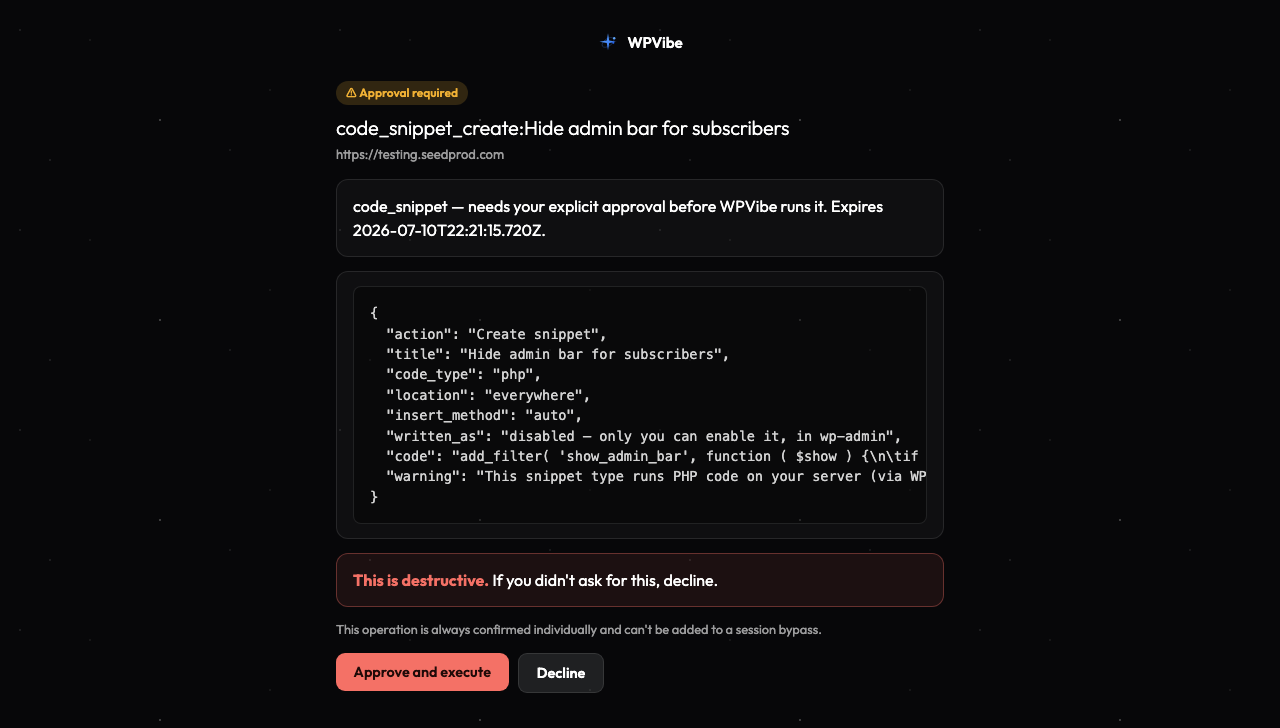
Gate two: every snippet is saved switched off. Approving a snippet stores it, but it does not run. You flip it on yourself in wp-admin, where WPCode runs its own fatal-error check as it activates. If the code would crash your site, WPCode catches it before your visitors do.
PHP snippets also get a syntax check at write time, so a stray typo is caught before it ever reaches the enable switch.
What you can do with it
- Add tracking and analytics scripts without opening your theme files. “Add my Plausible script to every page” is now a one-sentence request.
- Make small PHP tweaks that don’t deserve a whole plugin: disable emojis, change the excerpt length, register a custom shortcode.
- Drop in custom CSS for that one stubborn element, without touching your theme and losing the change at the next update.
- Work in six formats: PHP, JavaScript, CSS, HTML, universal, and plain text snippets are all supported.
Imagine reading a tutorial that says “add this code to your site,” highlighting it, and telling your AI: do this for me, safely. That’s the whole workflow now.
No side doors
A safety gate only counts if you can’t walk around it. So in the same release, we closed the alternate routes: WPVibe’s command-line tools can no longer create or edit WPCode snippets, their settings, or their placement rules. Snippet code goes through the approval panel or it doesn’t go anywhere. And enabling a snippet remains something only you can do, in your own wp-admin.
This is the part we’re most proud of, honestly. Anyone can add a feature that writes code to your site. The work is in making sure it can only happen in the open.
How to get started
Step 1: Install WPCode. The free version from WordPress.org is all you need. If it’s not installed, WPVibe will tell you plainly instead of failing with a cryptic error.
Step 2: Connect your site to WPVibe. If you haven’t yet, it takes about 30 seconds at wpvibe.ai/start. No Node, no SSH, works on any host.
Step 3: Ask for the change you want. Something like “add a snippet that hides the WordPress admin bar for subscribers.”
Step 4: Review and approve. The approval panel opens in your browser. Read the code (or don’t; the safety gates don’t care), approve it, then enable it in wp-admin when you’re ready.
Why we built it this way
We could have let the AI write snippets straight to your site. It would demo better. But “the AI edited my functions.php and now my store is down” is not a support ticket we ever want to read, and it’s definitely not one you want to send.
So the rule is the same one WPVibe applies everywhere: the AI drafts, you approve. Your site never changes without you saying go.
Give it a try, and tell us what you build with it. The first snippet is usually something small. That’s the point: small things should be small.
As always, thank you for using WPVibe. There’s a lot more coming.
John and the WPVibe team
P.S. WPVibe is free to start, and every feature (including snippets) is available on the free plan. Get connected at wpvibe.ai/start, or grab the plugin from WordPress.org (it’s listed there as “Vibe AI,” same plugin).