WPVibe Just Got More Powerful (and It Still Won’t Break Your Site)
You finally have an AI assistant that can actually touch your WordPress site. It writes your posts, edits your theme, cleans up your media. Amazing, right up until the moment it does something you did not ask for on your live site, and there is no undo.
That is the real reason most people keep their AI at arm’s length from WordPress. Not because it is not capable. Because one wrong move on a live site is a very bad day.
So here is what we have been building. The latest WPVibe update makes your AI dramatically more capable on WordPress, and it adds the guardrails that make that power safe to actually use. More power, same calm.
Let me walk you through what is new.
Upload your own images, no more broken links
Until now, when your AI added images to your site, it usually grabbed them from some public URL out on the web. Those links rot. The image looks fine today and is a broken gray box next month.
Now you can upload your own images straight from your device. Pick one file or a whole batch, drop them in, and they land in your real WordPress media library, hosted by you. No mystery URLs, no link rot, no surprise takedowns. The images you ship are the images you own.
Edit content surgically, not clumsily
Asking an AI to change one line in a 3,000 word post used to mean it pulled the entire post into the conversation, rewrote it, and pushed the whole thing back. Slow, expensive, and a great way to introduce changes you never asked for.
WPVibe can now make surgical edits. It finds the exact text you want changed in a post’s content, excerpt, title, a custom field, or a site setting, and replaces only that. The rest of your content is never touched. Fix a typo, swap a price, update a link, all without rewriting the page around it.
Do the big jobs, with a human in the loop
This is the one I am most proud of.
Real WordPress work is not always one post at a time. Sometimes you need to delete a hundred spam drafts, update a batch of posts, remove an old plugin, or run a database cleanup. Powerful, and also exactly the kind of thing you do not want an AI doing on a hunch.
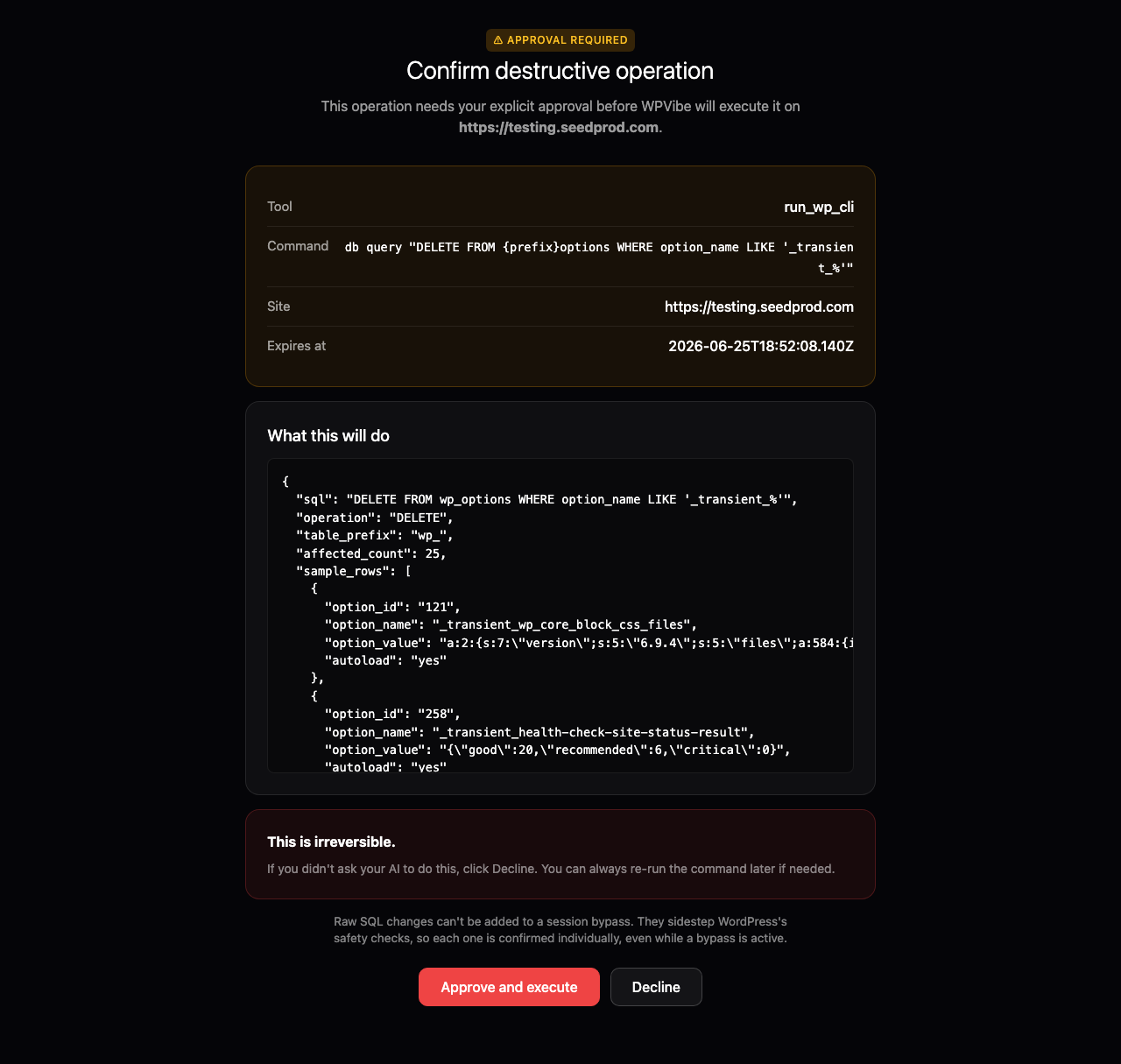
So WPVibe now handles bulk and database operations with one simple rule: anything reversible just runs, and anything permanent stops and asks you first.
- Bulk actions in one step. Delete, update, or clean up many posts, users, or plugins at once instead of one slow call at a time.
- A dry run before anything permanent. Before an irreversible operation runs, WPVibe shows you exactly what it will affect, including a count and a sample of the rows a database change will touch.
- You approve, then it acts. Permanent actions pause and surface an approval link. Nothing destructive happens until you open it and click confirm in your browser.
- Approve once, keep moving. For a repeated task you can approve that action type for the session, so you are not clicking confirm on every single item.
Reversible things, like moving a post to the trash, never interrupt you. Permanent things, like emptying that trash for good, always do. That is the whole idea.
Smoother, more reliable connections
We also put real time into the parts nobody tweets about but everybody feels: tightening the sign-in and connection flow so linking your AI to your site just works, and making error messages tell you what actually went wrong instead of leaving you guessing.
Imagine your next hour
Picture this. You ask your assistant to clean up the media library, fix the pricing on three landing pages, upload the new product shots from your laptop, and retire a plugin you stopped using. It does all of it in one conversation. The risky steps pause and ask. You glance, you confirm, you move on. An afternoon of busywork, gone before your coffee is cold.
Who this is for
WPVibe is perfect for:
- Site owners who want AI to do real work, not just draft text, without handing it the keys and hoping for the best.
- Agencies and freelancers cleaning up or migrating client sites, where bulk operations save hours and the approval step saves you from a disaster.
- Developers who want raw database access through their AI but refuse to give up a dry run and a confirm step.
How to get started
If you already have WPVibe connected, you have these features right now. If not, head to wpvibe.ai/start, enter your site URL, and WPVibe installs the free plugin for you in a few minutes.
Step 1: Connect your AI to your site. From your AI assistant, ask WPVibe to connect your WordPress site. You get a one-click link, with no passwords to paste.
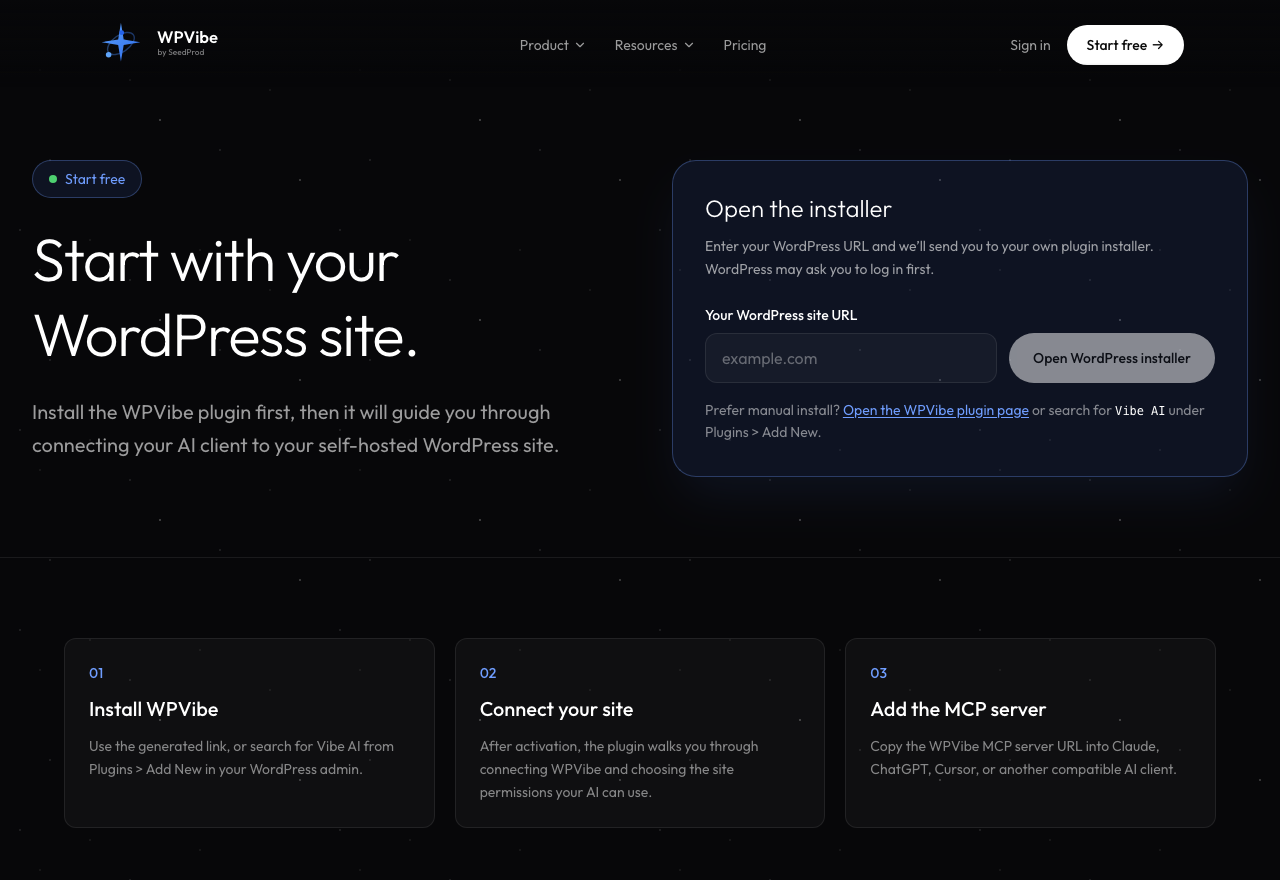
Step 2: Upload your images. Ask it to upload images, then drag your files into the upload page.

Step 3: Run a real task. Ask for something with teeth, like clearing out old drafts, and watch it pause for your approval.
But here is what makes this truly special
Most AI tools give you one of two things. Either they are cautious to the point of being useless, or they are powerful and you cross your fingers every time you hit enter.
WPVibe gives you both. The power to run bulk operations and raw database changes through plain conversation, and a hard line that anything it cannot undo has to get your okay first. You are never one overconfident reply away from a wrecked site.
Think about it. When was the last time a tool handed you more power and more safety in the same release?
Give it a try
So, what are you waiting for?
Try the new WPVibe features and let us know what you build. As always, thank you for your support of WPVibe, and we have plenty more on the way.
John and the WPVibe team
P.S. Not using WPVibe yet? Install the free WPVibe plugin, and it works with the AI assistant you already use. Connect your site and see why ‘your AI just learned WordPress’ is more than a tagline.