AI Wrote My SEO Titles and Meta. Here’s How It Went.
Every post I publish needs an SEO title, a meta description, and a focus keyphrase. I’ve written thousands of them by hand, and I would happily never write another one.
Code isn’t my world. I write for a living, so when people started saying AI could just run WordPress for you now, the first job I wanted off my plate wasn’t anything clever, it was this boring, endless little chore.
So I gave it a go. I asked an AI to write the SEO fields for one post, then went digging to see whether any of it had actually saved.
This whole experiment is basically me doing the tedious stuff, so you don’t have to.
How I Set Up This Experiment
To figure out whether I could actually pull this off, I kept the setup simple. I used Claude Code as the assistant and connected it to a real WordPress test site through WPVibe.
The site was a small demo shop running the free version of AIOSEO, the SEO plugin I use across all of my own sites to handle titles, meta descriptions, and the rest. Just the free version, with no paid extras.
One thing I decided up front was I wasn’t going to take Claude’s word for anything. Earlier in this project a different plugin swore a save had gone through when nothing had actually changed, so this time I planned to check the results against what was really stored before I believed a thing. (That saga is in my run through 25 plugins where only 6 actually worked.)
I Asked for a Title, a Meta Description, and a Keyphrase
I gave Claude a single instruction: read this post, write the SEO title, the meta description, and the focus keyphrase, and save them.
The post was one about houseplants for people who forget to water them. Claude came back with the title “5 Low-Maintenance Houseplants That Survive a Forgetful Owner,” the meta description (which actually read like a person wrote it), and the keyphrase “low maintenance houseplants.”
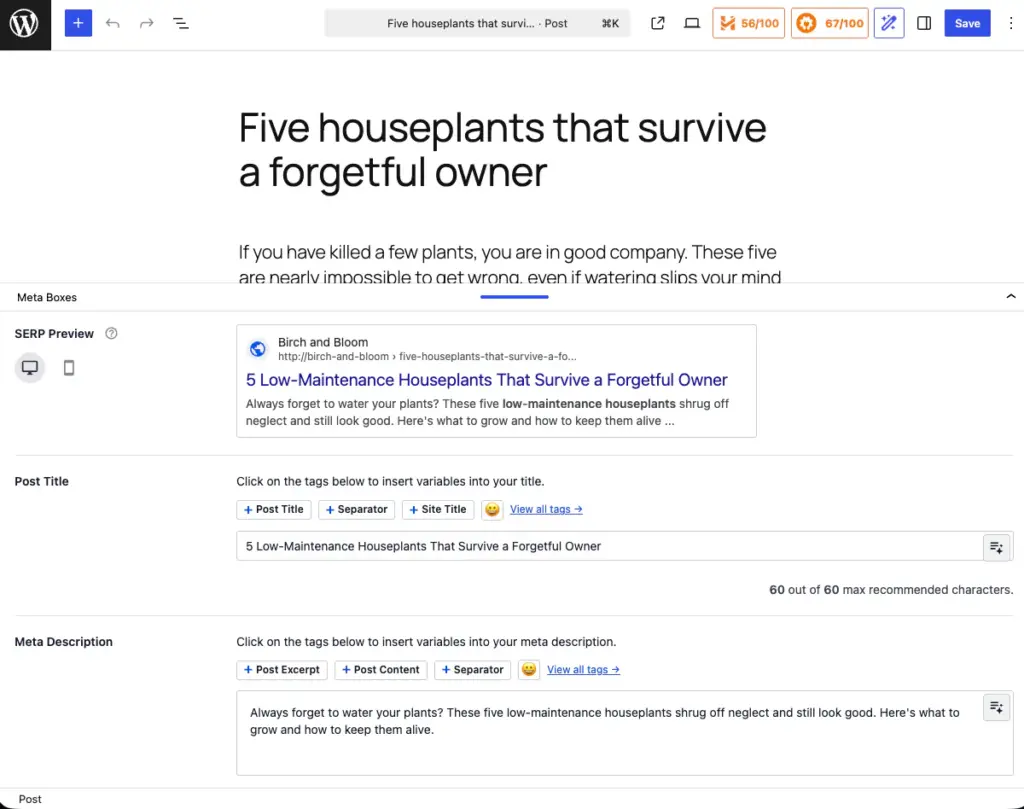
The whole thing happened right inside the chat window, without me visiting the actual WordPress post once.
How does a chat window write to WordPress, though?
The free version of AIOSEO gives an AI a short menu of jobs it’s allowed to do, thirteen of them, and one of those is read a post and update its SEO fields. That’s the one Claude used, reached through WPVibe.
I Checked the Database to Make Sure It Saved
This is the part most demos skip. Anyone can screenshot a “done” message, so I went a layer deeper and pulled up what WordPress had actually stored for that post.
The title was there. The meta description and the keyphrase too, word for word.
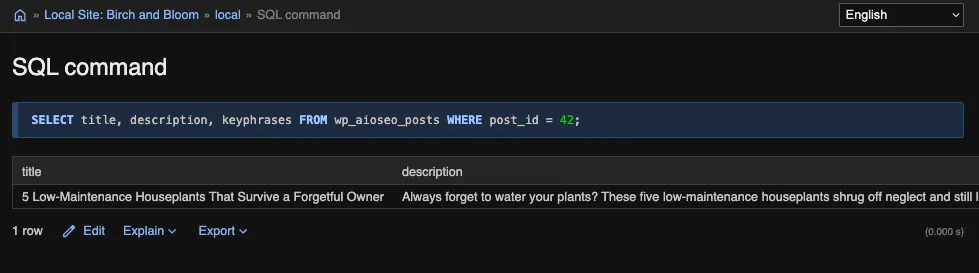
You wouldn’t need to do this yourself, to be clear. I only went digging because it’s my job to be sure before I tell you something works.
It Blocked GPTBot in robots.txt Too
Writing SEO fields is only one of the things I’d use this for. I wanted to watch Claude touch something completely different.
So I asked it to add a rule to my robots.txt blocking GPTBot, OpenAI’s crawler, from a test folder. That’s the kind of thing you’d do to keep a section of your site from being scooped up for AI training.
It did, and handed back an ID for the new rule.
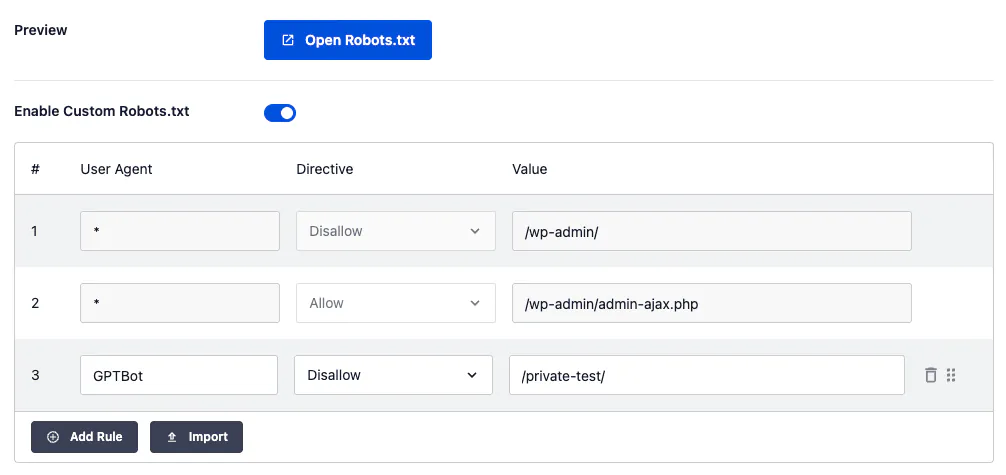
Then I asked it to undo the change, and it deleted the rule just as easily.
So this isn’t a trick that only fires once. I witnessed a real change, and a clean reversal, just by asking. It got another technical SEO detail right without me raising it: when I took a site into maintenance mode, the site came back as a 503 rather than a 200.
Why It’s 13 Free Abilities, Not 28
Here’s one thing worth clearing up. AIOSEO’s own announcement talks about 28 abilities, and I don’t want you counting to thirteen and feeling short-changed.
The missing fifteen are paid features, things like the redirect manager (I did redirects free with the Redirection plugin instead) and the search-statistics tools, that simply aren’t switched on in the free version. Thirteen is what free gets you, and thirteen did everything you’ve read so far.
That announcement also leaned hard on the phrase “MCP support,” which sounds like a brand-new superpower. Really it just added another entrance to the same thirteen jobs, and WPVibe was already getting in through a different door.
What genuinely surprised me is how unusual any of this still is. Most SEO plugins give an AI nothing it can save to.
Rank Math, the big rival, is betting on the same future and even ships its own AI server. But connect it the way I connected AIOSEO and it hands Claude no jobs it can actually run today.
AIOSEO is one of the few that already lets the AI all the way in.
What I Still Do Myself
Now, I’m not going to tell you this whole process replaced me. It filled the boxes, but the decisions that matter didn’t move an inch.
Take the keyphrase. Claude picked a sensible one, but I know things about this site that it doesn’t, so I swapped it, and I rewrote the title too because mine had more bite.
It also can’t get into the plugin’s settings. The abilities that read your SEO health are look-only, so Claude can tell me a page is missing its meta description, but it can’t wander into the configuration and start flipping switches.
Which suits me fine, honestly. That’s exactly the sort of thing I want it to ask me about first.
How to Try This on Your Own Site
If you want to manage your SEO with AI, don’t hand over your whole site on day one. Pick one post.
Let the AI write its SEO fields, then go and check the result yourself, the way I did. It’s low stakes, and you find out fast whether you trust it.
WPVibe is what connected Claude to my WordPress site through all of this. Setup runs about a minute, it works with Claude, ChatGPT, and Cursor, and nothing touches your site until you approve it.
That approval step is the only reason I trusted it on a real install. You can get started for free and hand it your first post today.