How to Set Up a 301 Redirect in WordPress, by Hand or AI

Broken links don’t announce themselves. You retire a product, reshuffle a shop, clear out a few tired posts, and months later there’s a quiet pile of dead URLs sending visitors and Google into a wall.
Sorting them out, one 301 redirect at a time, is the chore I put off the longest, because it’s fiddly and dull and never feels urgent until the traffic has already gone.
So this time I didn’t do it by hand. I pointed an AI assistant at one of my sites and asked it to clear the mess.
It read the 404 log, set the redirect plugin up itself, and turned the dead URLs into proper 301s. All of it happened in a chat window, not the WordPress dashboard.
First, the plain way to set a redirect up yourself. Then the tedious part handed off, so you can decide whether that’s worth doing yourself.
How to Set Up a 301 Redirect in WordPress
WordPress has no redirect tool of its own, so this needs a plugin. The free Redirection is the one I use, and the first time you open it, it runs a short setup and builds its own database tables.
Once it’s installed, a single redirect takes about a minute:
- Go to Tools > Redirection and stay on the Redirects tab.
- Click Add redirect.
- Put the old, broken address in Source URL, and the page you want people to land on in Target URL.
- Open the advanced options with the cog icon and check that HTTP code is set to 301.
- Save it. The rule joins the list underneath, with 301 showing in the Code column.
That 301 is the bit that matters. It tells Google the move is permanent, so whatever ranking the old address had carries over instead of evaporating.
So one is easy. The catch is that broken links never turn up one at a time, and the rest of this post is what I did about the pile.
How I Connected Claude to the Site
The assistant was Claude, and the bridge to my site was WPVibe, a remote MCP server that lets an AI client reach a WordPress site’s own REST API. If you already run AI against your sites, that’s the whole setup in a sentence.
I ran it on a demo garden shop I keep for this sort of testing, called Birch and Bloom. It’s the same shop I later took offline from the same chat window. The redirect work is handled by Redirection, the free plugin by John Godley with around two million active installs, and everything here ran on that free version.
The Broken Links I’d Been Ignoring
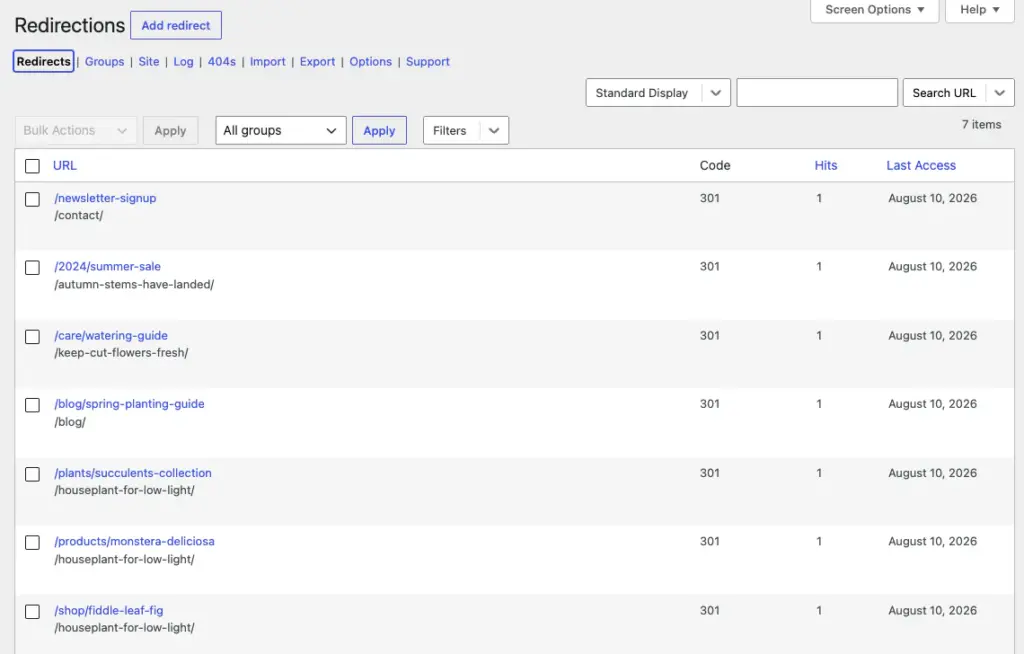
The shop had got into a bit of a state. Seven dead URLs with a dozen hits between them:
- A retired fiddle-leaf-fig product page
- The monstera page, long gone
- An old spring planting guide
- The 2024 summer sale
- A watering guide
- The succulents collection
- A newsletter signup that led nowhere
None of it was on fire, which is exactly why it sits there. I’m a content person, not someone who lives in redirect logs, so this stuff just piles up until something makes me look.
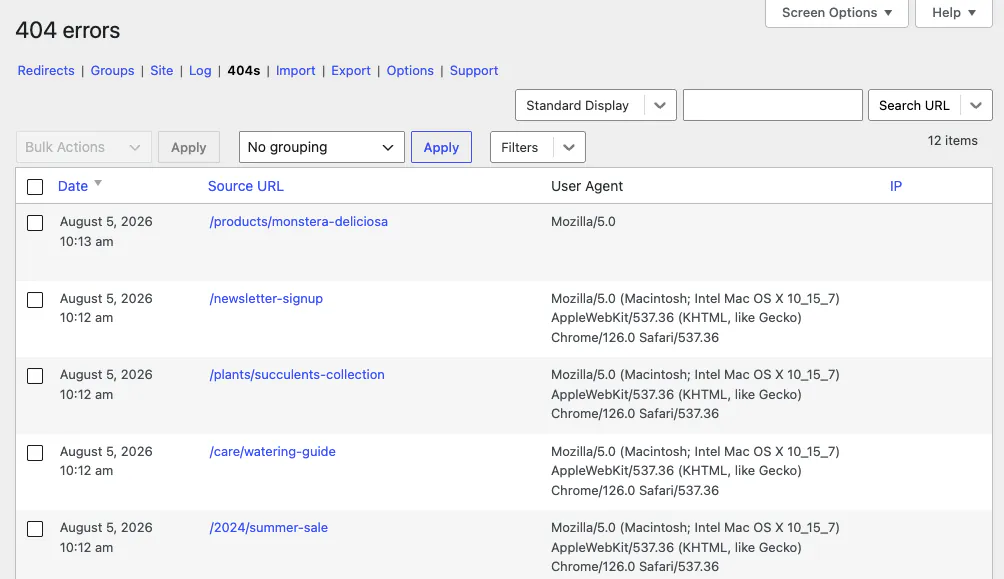
On their own a few 404s won’t tank a site, but they cost you the odd visitor and a bit of crawl budget, and they leave the place feeling a little unloved.
Claude Read My 404s Straight From the Log
I started with the obvious ask, show me what’s breaking, worst first. Claude pulled the log and laid it out by hit count, with the monstera and the fiddle-leaf-fig tied at the top on three hits each, the planting guide next at two, and everything else trailing on one.
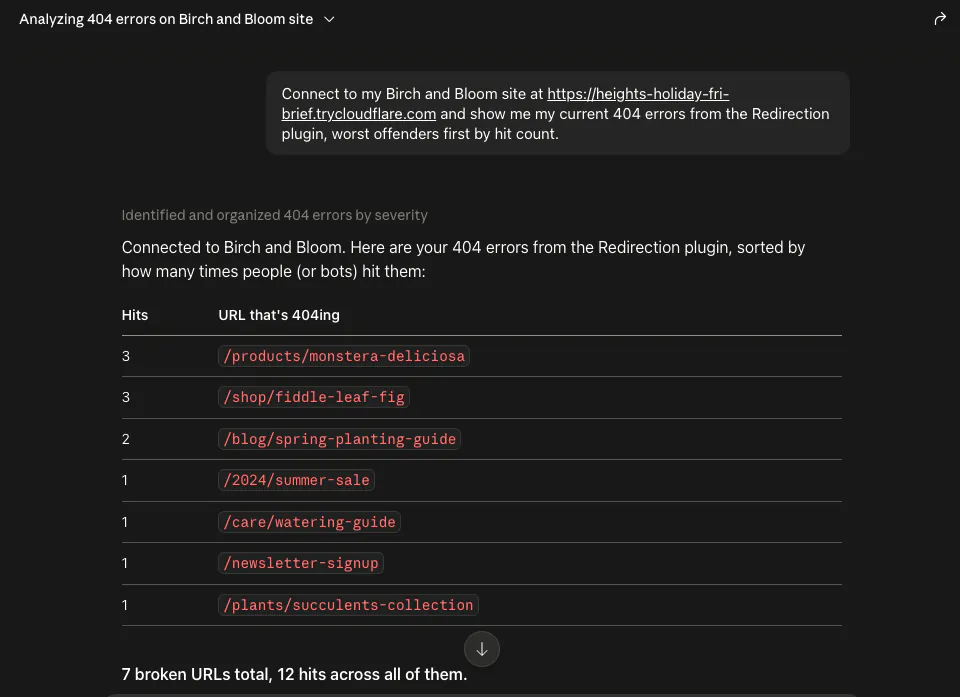
What I liked is that Claude wasn’t guessing. It was reading the plugin’s real record of logged traffic, the same screen I’d normally squint at myself, except I didn’t have to.
And Turned the Worst Ones Into 301s
Reading the 404s is the easy half. The fix is the bit that actually saves time, and I told Claude where each dead URL should point so it could build the redirects one by one.
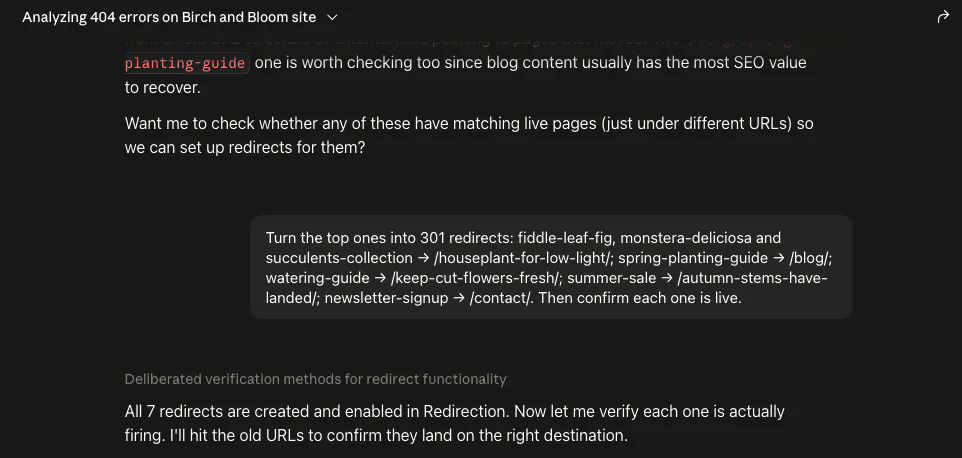
The two plant pages and the succulents collection went to a low-light houseplant guide that’s still live. The old planting post went to the blog, the watering guide to a cut-flowers care post, the summer sale to this year’s autumn range, and the signup page to contact.
Then it did the bit I’d normally skip and checked its own work, requesting each old URL to confirm the 301 fired and landed where it should. You wouldn’t need to do that yourself, since the plugin handles it once the rule exists, but I like seeing the proof.
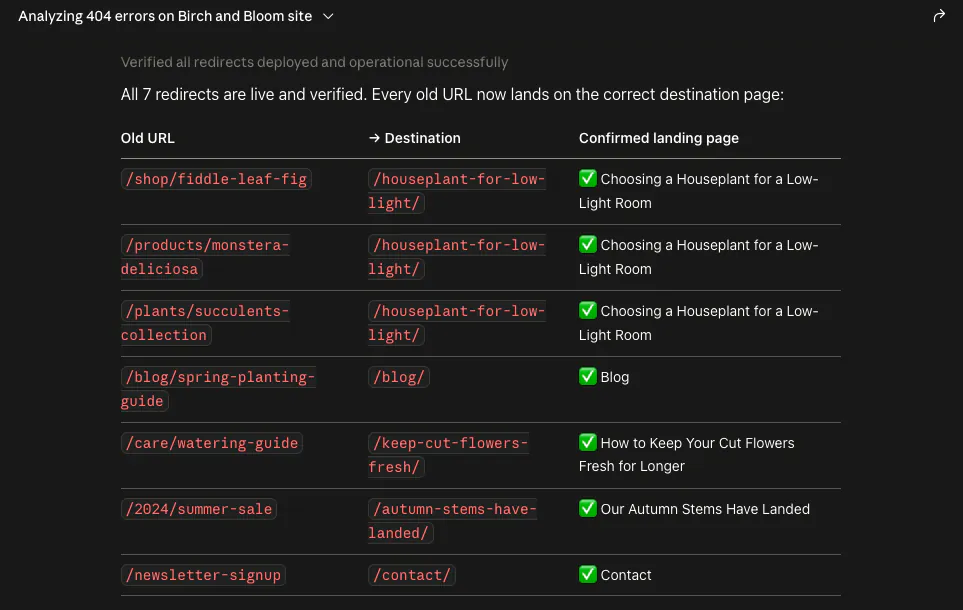
All seven went in as live 301s, which was the whole job done in less time than it would have taken me to find the first one by hand.
Claude Installed and Configured the Plugin From Scratch
The part that genuinely surprised me came earlier. When I first pointed an assistant at this site, Redirection wasn’t even set up, and its database tables didn’t exist yet.
Claude built them, running the plugin’s own setup routine to create the four tables Redirection needs before it can log a single 404, and only then got to work.
What makes that odd is that Redirection has none of the purpose-built AI features some SEO plugins are starting to ship. It ran end to end from a chat anyway, and when I tested 25 plugins this way, only six turned out to be this drivable.
The reason is almost boring.
The plugin’s whole admin is a REST API, so every screen you’d click in the dashboard is really an endpoint underneath. WPVibe bridges the assistant to those endpoints, which means it can do anything the dashboard can, and whether a plugin has an “AI mode” turns out to be the wrong question.
To be fair to the alternative, if your redirect tool lives behind a paid SEO plugin’s upgrade, then on a free setup it isn’t really in the running, and Redirection is simply the one an assistant can drive end to end for nothing. If you already pay for that SEO plugin, keeping your redirects and your SEO in one place is a real convenience worth weighing.
What AI Still Can’t Decide About Your 404s
So this is a handed-off-the-chore story, not an AI-runs-my-site one, and the difference matters. Claude did every mechanical step, from the install and the setup to reading the log, building the redirects, and checking each one.
What it didn’t do, and shouldn’t, is the judgement. Two calls stayed with me, the first being which 404s are real lost pages worth saving rather than bot noise, and the second being where each broken URL should actually go.
A retired product deserves a replacement you’ve actually thought about, not a lazy bounce to the homepage, and only I know my own content well enough to make that call. Claude offered to hunt for matching live pages when I asked, which helped, but the final mapping was mine.
One thing I’ll flag rather than pretend I’ve tested it properly, is that all of this went through on nothing more than an application password. That’s convenient, and it also means that single credential is the keys to your redirect rules, so whether the trade sits right with you is worth a thought before you wire it up.
Frequently Asked Questions
What is a 301 redirect?
A 301 redirect is a permanent forward from one URL to another. Anyone who visits the old address, person or search engine, lands on the new one automatically, and Google treats the new page as the one to show in results from then on.
301 or 302: which should I use?
Choosing between a 301 or 302 redirect comes down to whether the page has moved for good or only for a while. Use a 301 when the move is permanent, like a retired product, a renamed post or two posts merged into one. Use a 302 when it’s temporary and you want the original URL to stay in search results, such as a seasonal page you’ll bring back. For clearing out dead URLs, which is what I was doing here, it’s a 301 almost every time.
Do I need the Pro version of Redirection for this?
You don’t need the Pro version of Redirection for this. Everything here ran on the free plugin, with no paid tier switched on. The redirect and 404-log functionality an assistant needs is all in the free version.
Does the AI decide where my broken links should point?
The AI doesn’t decide where your broken links should point, and you don’t want it to. The assistant reads the 404s and creates whatever redirects you specify, but choosing the right destination for each dead URL is a judgement call about your own content. That part stays with you.
What is WPVibe, exactly?
WPVibe is a remote MCP server that connects an AI client to your WordPress site’s REST API. That connection is the only reason an assistant can drive a plugin like Redirection, which has no AI features of its own.
How does the assistant authenticate to my site?
The assistant authenticates through a standard WordPress application password, set when you first connect your site. It’s simple to set up, and worth treating carefully, since that one credential is enough to create or change redirect rules.
Would I Do It This Way Again
Yes, for the mechanical parts, without hesitation. The reading, the setup, the rule-writing, the checking, that’s exactly the dull, careful work I’m happy never to touch again.
The deciding stays with me, and honestly I’m glad it does. A chore I’d been dreading turned into a short conversation, and the only thing left on my plate was the part actually worth my time.
If you’d rather have the exact steps than the story, we wrote this up as a recipe: Find and Redirect 404 Errors with AI.
If you fancy handing off the same kind of busywork, WPVibe is the piece that connects your AI assistant to your WordPress site. You can get started with WPVibe for free and point it at your own 404s to see how far it gets.