Agency Plans: Invite Clients and Manage Sub-Accounts
What the Agency plan includes
The Agency plan ($99/month or $599/year) is built for teams managing WordPress sites for clients. It includes 50x more daily usage than Free (5,000 tool calls a day on a rolling 24-hour window), client invitations with per-client daily allowances, and per-client usage reporting with CSV export. The Scale plan ($149/month or $899/year) doubles the daily usage to 10,000 and includes everything in Agency.
Need your company name, address or VAT ID on an invoice? Subscribe through the normal checkout, then email [email protected] from your account email with the details, and we will send you an invoice that shows them.
How client sub-accounts work
Every client keeps their own WPVibe account, their own sign-in, and their own AI client. An invitation links their account to your agency so their usage can draw from your plan’s daily pool. You never share passwords, and clients never see WPVibe pricing or upgrade prompts. If their allowance runs out, they are told to contact your agency.
You do not have to invite every client
Invitations exist for clients who will use their own AI assistant. If you manage a site entirely on the client’s behalf, skip the invitation: connect the client’s site to your own WPVibe account and turn on white label mode. The client never receives an email, never creates a WPVibe account, and never sees WPVibe in their dashboard. The trade-off is that the site’s usage draws on your own daily allowance with no per-client cap, and it will not appear as a separate client in your usage reporting.
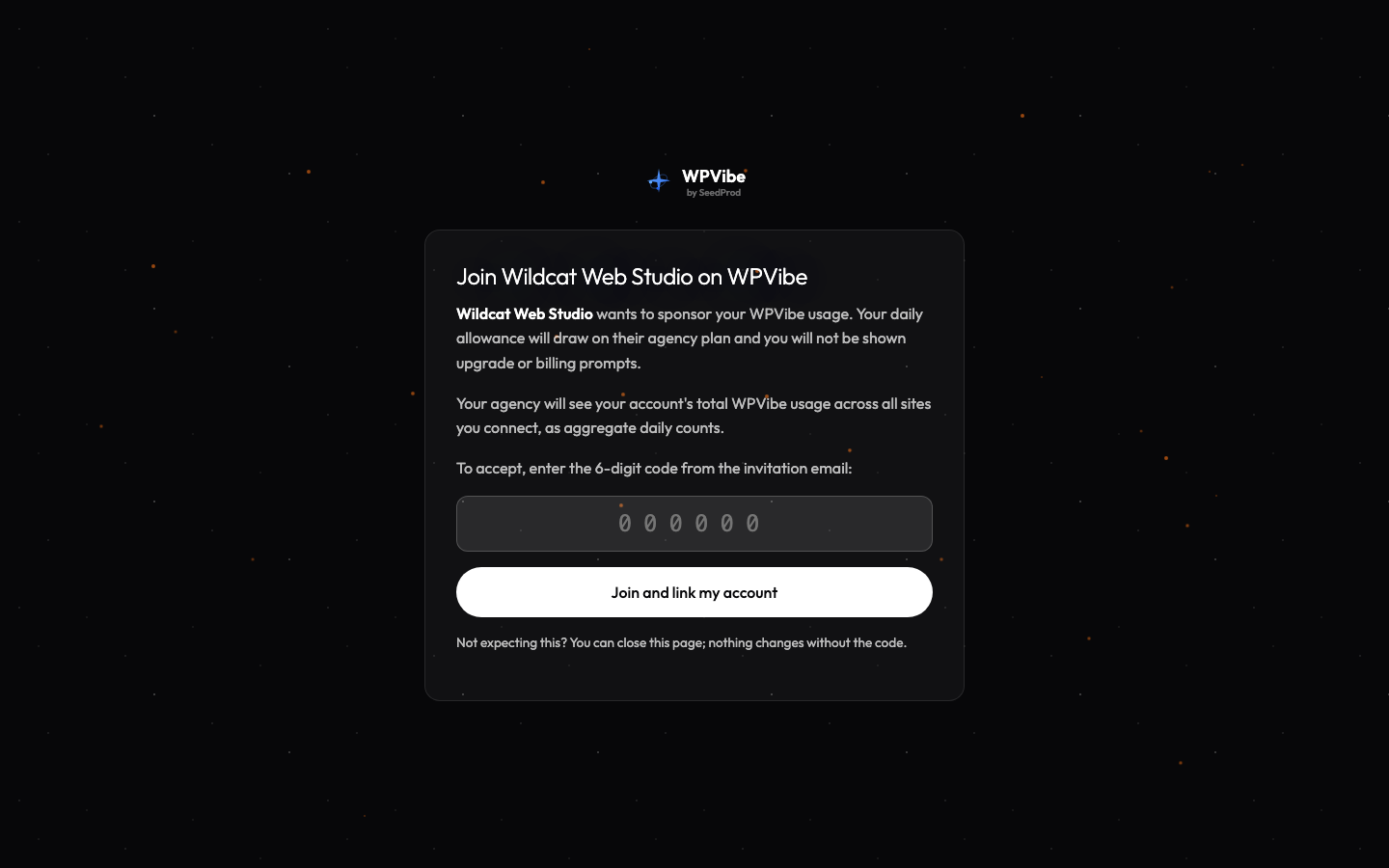
WPVibe never creates an account on a client’s behalf. A sponsored sub-account only exists once the client signs in themselves and types the 6-digit code from the invitation. That typed code is the consent step, since joining gives you visibility into their aggregate usage.
Invite a client
- Sign in at mcp.wpvibe.ai/account with your Agency or Scale account.
- In the Agency card, enter your client’s email address and send the invitation.
- Your client receives an email with a link and a 6-digit code. They sign in with the invited email address, then type the code to accept. Typing the code is the consent step, so an email scanner or an accidental click can never join someone to your agency.
- Once accepted, the client appears in your member list with an allowance you control.
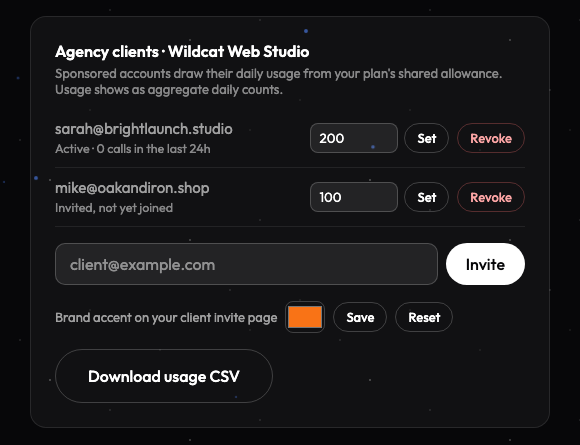
Invitations expire after 14 days, and you can send up to 20 per day. Before accepting, your client sees exactly what you will have access to: their account’s total daily usage as aggregate counts, never the content of their work.
What your client sees
The invitation email comes from WPVibe ([email protected]) and names your agency in the message. Your client signs in at wpvibe.ai and accepts on a WPVibe page that shows your agency’s name. Day to day, their AI assistant connects to WPVibe, so the WPVibe name appears in their AI client’s connector list. You can set a brand accent color in the Agency card on your account page, and the invitation accept page is themed with it. Sponsored clients never see WPVibe pricing, upgrade prompts, or billing; if they reach their allowance they are told to contact your agency.
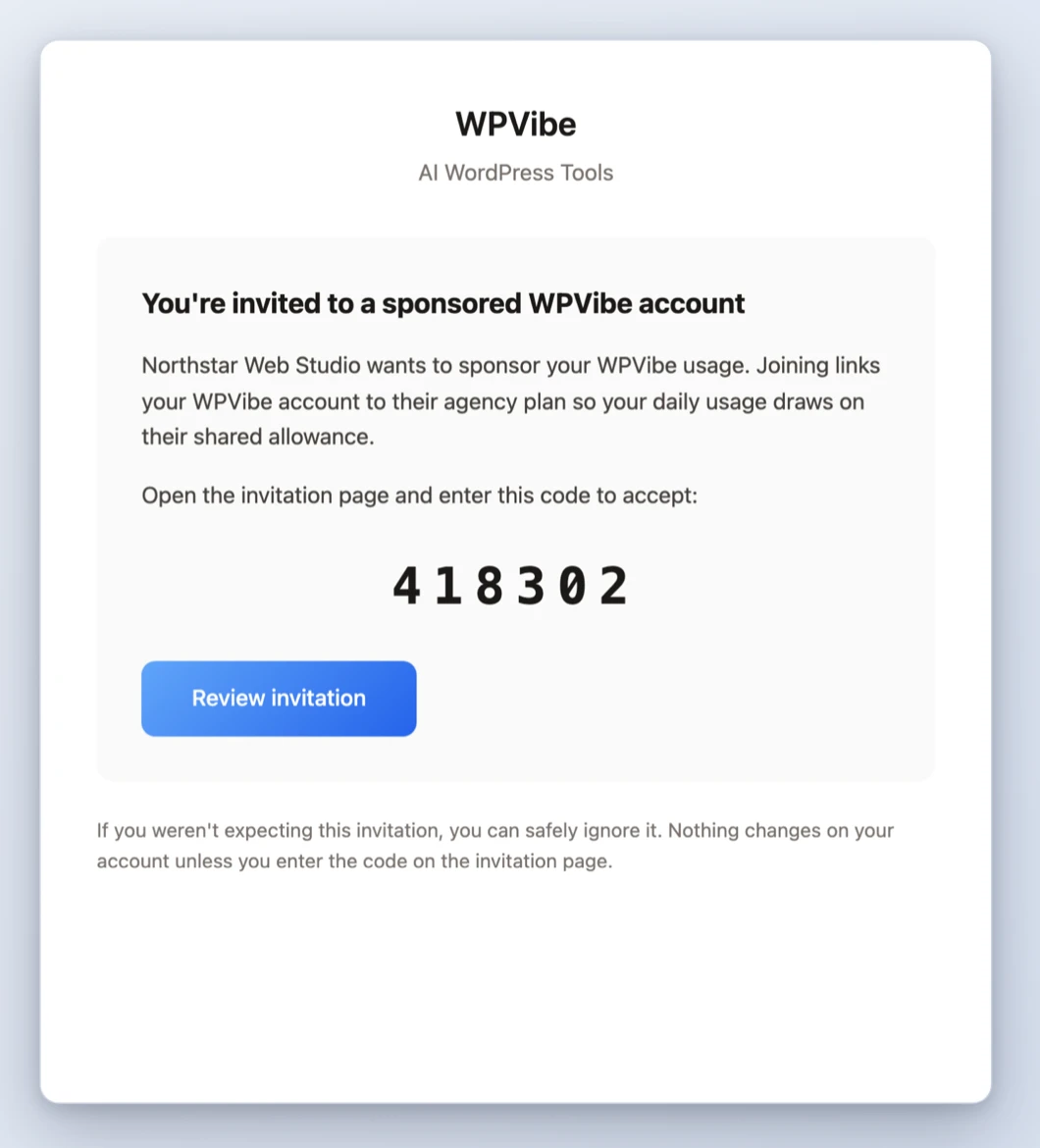
Invitations always come from WPVibe rather than your agency’s own email address on purpose: it means a client can always verify that an invitation is genuine before linking their account. To hide WPVibe from a client’s WordPress dashboard itself, see White Label Mode.
Allowances and the shared pool
Each client gets a daily allowance you set (for example 100 calls a day for a casual client, 500 for an active one). A client’s effective daily limit is the larger of their own plan’s limit or the allowance you set. Your pool only funds usage beyond what the client’s own plan already covers, and your own usage draws from the same pool. Allowance changes take effect immediately.
Usage reporting
The Agency card shows each sponsored client’s daily usage as aggregate counts, and you can export a CSV of daily counts per client for your own record-keeping or re-billing. WPVibe never shows you the content of a client’s sites or what they asked their AI to do, only how much they used.
Removing a client
Revoking a client is immediate: their account unlinks from your agency and falls back to their own plan’s limits. They keep their WPVibe account, their connected sites, and their history. A departing client can subscribe on their own at any time.
If your payment lapses
If your agency subscription has a payment problem, your clients are not cut off abruptly. Sponsored limits continue for 7 days while you fix the payment, then a reduced allowance applies for another 7 days before clients return to their own plan’s limits. Only you receive billing notices; clients never see a checkout link.
White label on client sites
Client sites can run with WPVibe hidden from the WordPress dashboard entirely, free on every plan. See White Label Mode: Hide WPVibe on Client Sites.
Need more than Scale?
If your team regularly presses the Scale ceiling, email [email protected] and we will set up a plan that fits.