I Had AI Build My Custom WordPress Theme. Building Was the Easy Part.
I launched a new website on 1 October. My personal site now runs on a custom WordPress theme that Claude built through WPVibe, and I didn’t write a line of it.
I’d been putting a redesign off for two reasons. I didn’t know what I wanted, and I didn’t know how to build it.
Only one of those turned out to be hard, and it wasn’t the building. The build and launch took 2 hours 47 minutes over two sessions. Working out what I actually wanted took more than 50 rounds of design, spread over nearly three weeks of spare time around my day job, and one finished design I threw away.
So this is what getting a custom theme from AI is really like when you can’t code, including the part that took the longest.
What’s on this page:
- My old site felt cold and clinical
- I threw away a finished design for a scrapbook
- Claude built my custom WordPress theme as a draft
- The things AI caught that I’d have missed
- I filled the scrapbook, then switched it live
- Who did what: me, Claude and WPVibe
- Frequently asked questions
- Would I let AI redesign my site again
My Old Site Felt Cold and Clinical
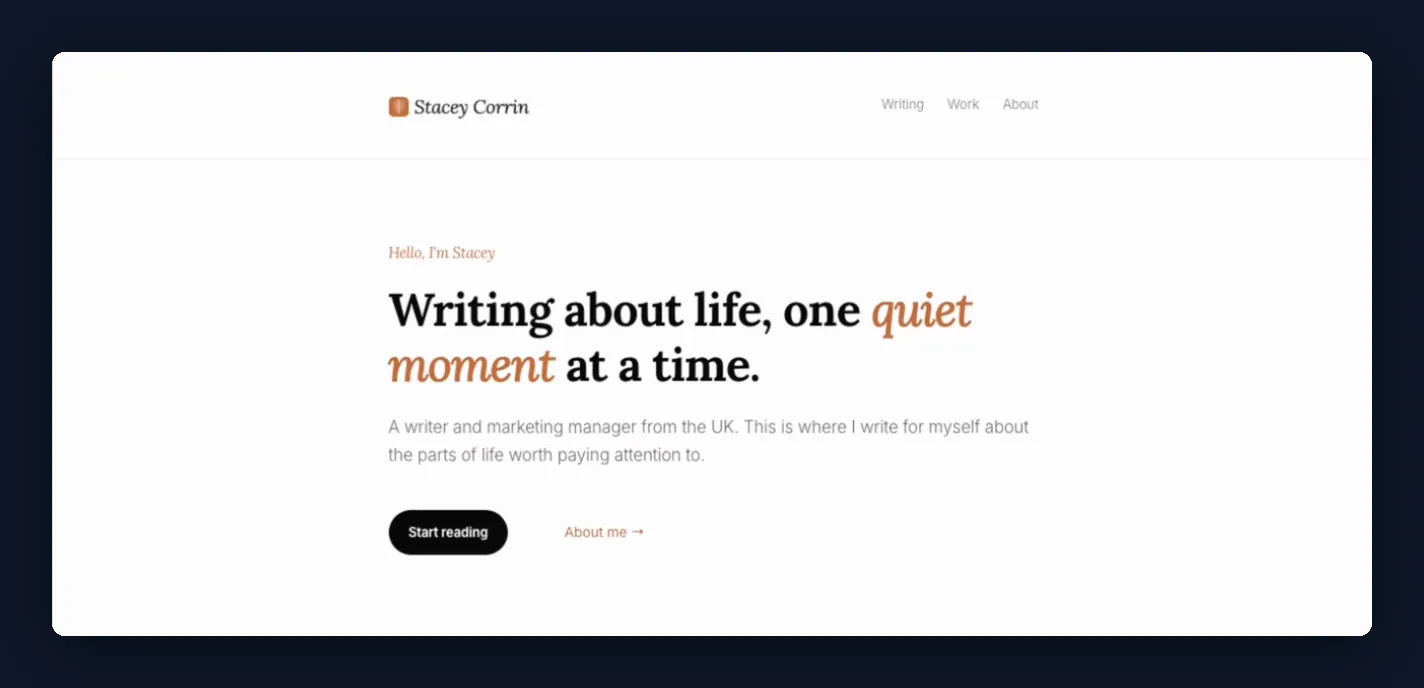
My old site didn’t feel like me personally. It felt too cold and clinical, and it only really worked for long posts.
What I wanted was a place where I can jot down random thoughts rather than just long posts, like a virtual scrapbook. I couldn’t have told you what that looked like, though.
I’d built the old one myself, with SeedProd‘s Website Builder, the drag-and-drop tool behind the whole site. Before that I’d customized plenty of other bloggers’ sites with page builders, so I’m not new to making WordPress look the way I want.
A custom theme was a different thing entirely. It’s not something I have the knowledge of doing, and that was the second reason the redesign kept sliding down my list.
I Threw Away a Finished Design for a Scrapbook
Claude’s first designs arrived as page mockups, and I picked a photo-led grid. My essays sat in tiles with my own photographs between them, plus a little Currently panel for what I was reading.
Over the next five days, in bits of free time around my day job, Claude designed the whole site around it, including
- the homepage
- an About page
- a Work page
- an archive of every post
- a page for reading a single post
It looked lovely. It just wasn’t mine.
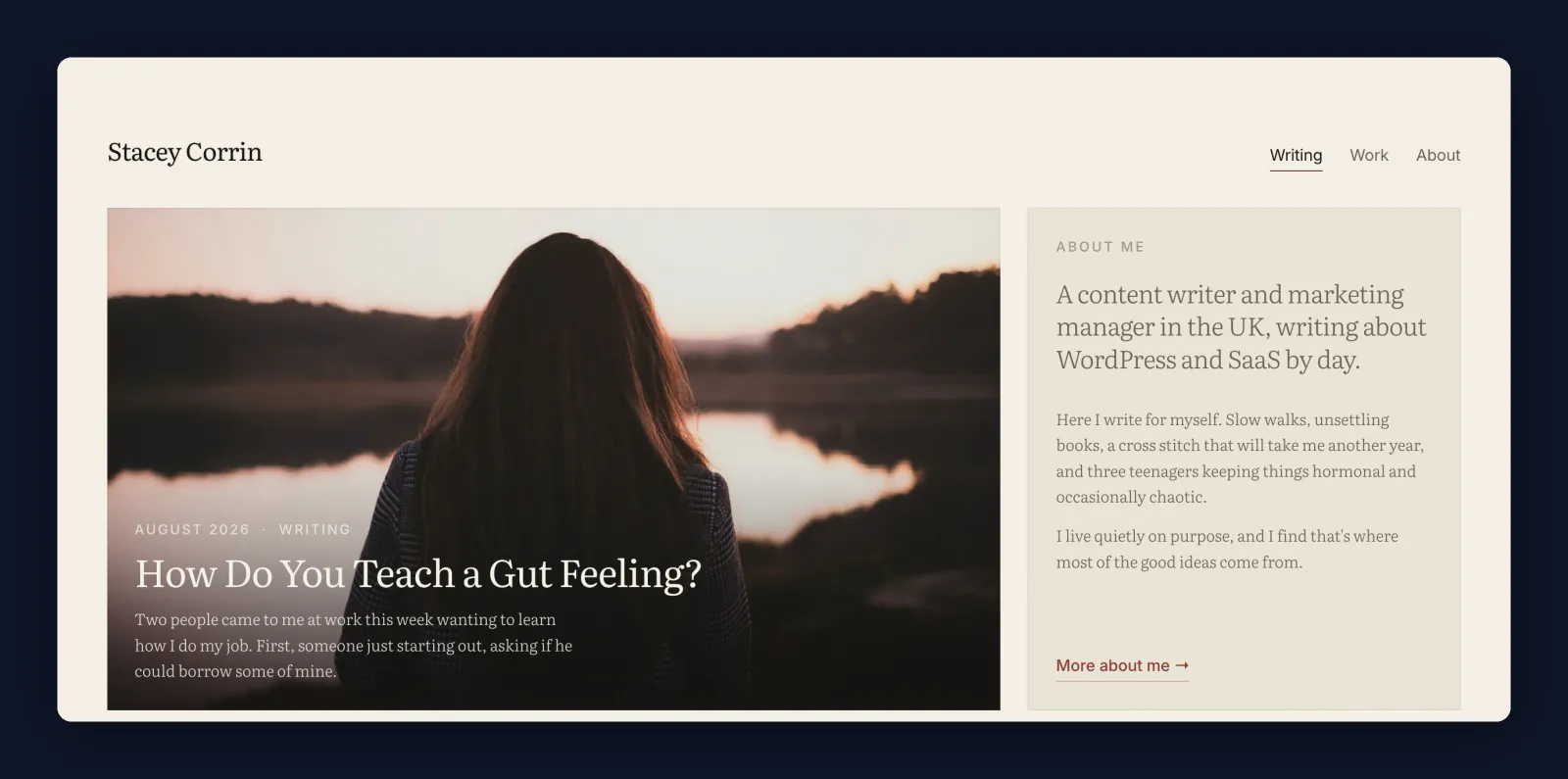
It felt like something somebody else would make, not something I’d make. Which, honestly, was the same problem my old site had. I’d swapped a site that didn’t feel like me for a nicer-looking one that didn’t either.
So later that month I asked for something different. I wanted short dated notes, like a personal feed, with my essays mixed in. The AI came back the same day with four new directions to choose from.
- Notes feed
- Timeline, like a social profile
- Old-book style, in dark green and gold
- Scrapbook, with sticky notes and taped-on polaroids
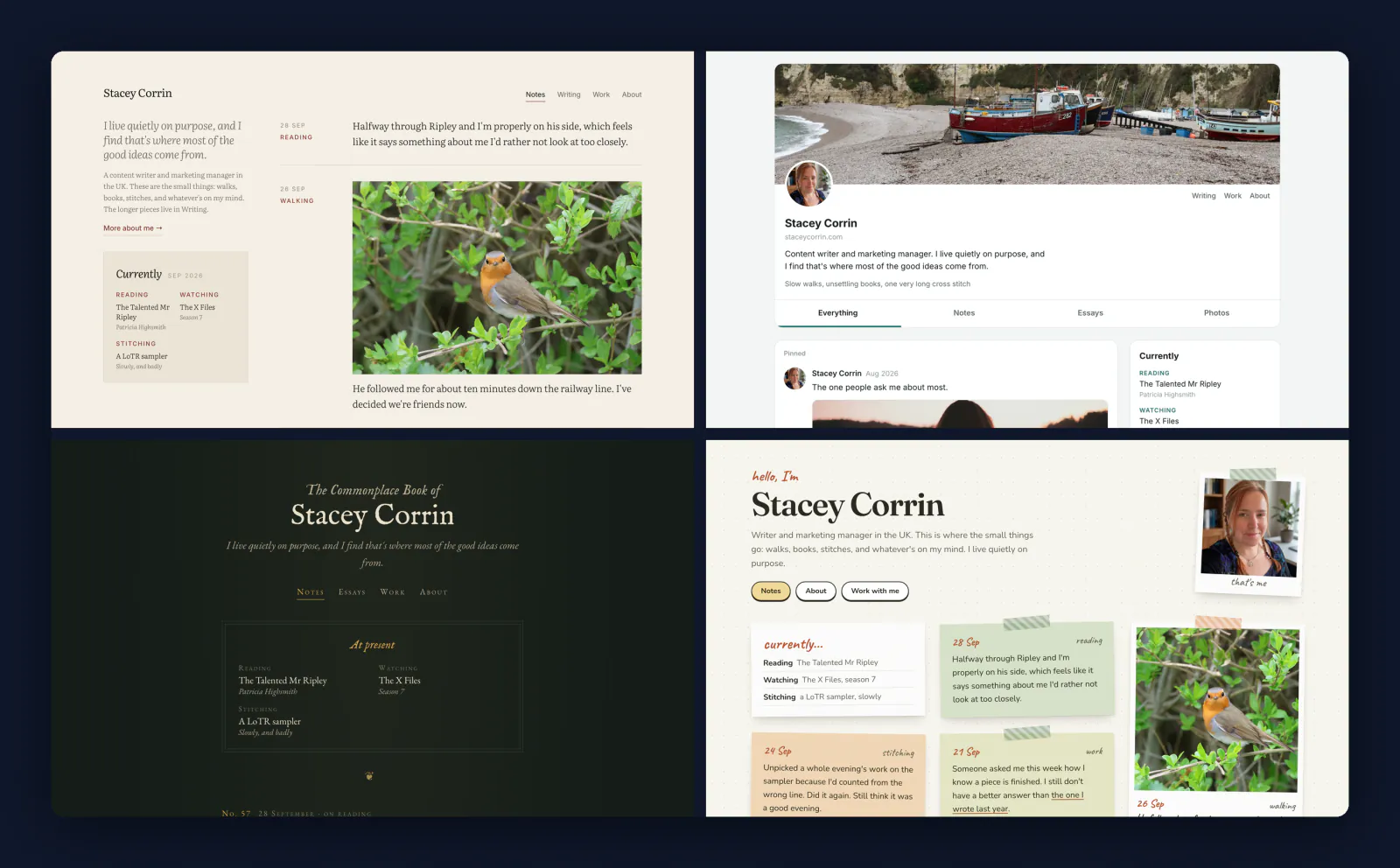
The scrapbook was the first one that looked like me. I tried a few variations, including a pinboard and a “witchy” one I found far too much, and kept going back to the original scrapbook. By the end of that day it was locked.
That’s where the time really went. Not on code, but on finding out what I wanted, which I couldn’t have described until AI showed me what it wasn’t. A finished design can still be the wrong one.
Claude Built My Custom WordPress Theme as a Draft
With the scrapbook locked, the build started the next day. Claude wrote the theme itself, 17 files of it, and WPVibe, which connects Claude to my WordPress site, put it on my real site as a draft rather than swapping it in.
The AI’s update put it plainly: “The live site isn’t touched by any of this.” Visitors kept seeing my old site the whole time.
To see the new one, I used WPVibe’s draft preview, a private link that shows the draft theme on my own site while logged-out visitors get the live version exactly as it was. So I was checking the real thing on my real domain, not a mockup.
WPVibe also checked each code file for mistakes as it was uploaded, which is the kind of safety net I’d never have thought to ask for. I added my photos and logos myself through WPVibe’s upload page, and they landed straight in the media library.
Then, clicking around the preview, I noticed one of my long yellow notes fading out into a green band. I sent Claude a screenshot and typed “I noticed a problem here”.
Under a minute later it came back with this: “That fade was the only style tied to one fixed colour, so nothing else has the same problem. Refresh the preview and the yellow note should fade into yellow.” The cause was simple enough even for me to follow. The scrapbook mockup only ever had a green long note, so the fade had been written for green.
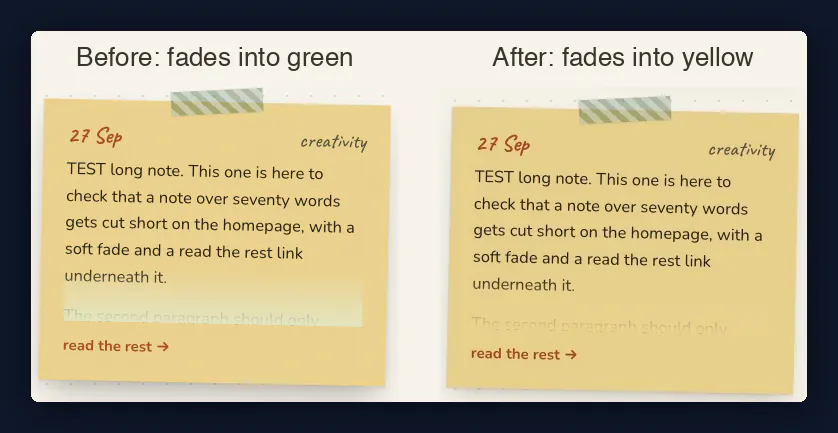
It’s a small thing, but that one was my catch.
John has written up his own AI rebuild too, and it’s the better read if you build sites for clients rather than for yourself: I Rebuilt My WordPress Site with AI in Under an Hour.
The Things AI Caught That I’d Have Missed
Most of what impressed me wasn’t the code, which I can’t judge anyway. It was the things Claude noticed that I’d never have thought to check, including
- Old layouts waiting to break the launch. Claude found seven saved layouts and styles left over from my old site that would have overridden the new design the moment it went live. At launch, WPVibe parked them under an “old” label, so they can come back if I ever want them.
- Location tags on my photos. Photos can carry the place they were taken, and the AI stripped those tags before anything went public.
- Strangers in my pictures. It left out two shots where strangers’ faces were clear, and blurred a van’s number plate in another.
- A design call that was mine to make. Some of my notes were going to be from last year, and the locked design had never shown one. So Claude asked me whether older notes should show their year, rather than quietly changing the design itself.
- Measuring instead of eyeballing. It checked the About page against the mockup and reported “About matches on all 162 measurements, at desktop and phone width.” I’d have glanced at it and called it close enough.
I Filled the Scrapbook, Then Switched It Live
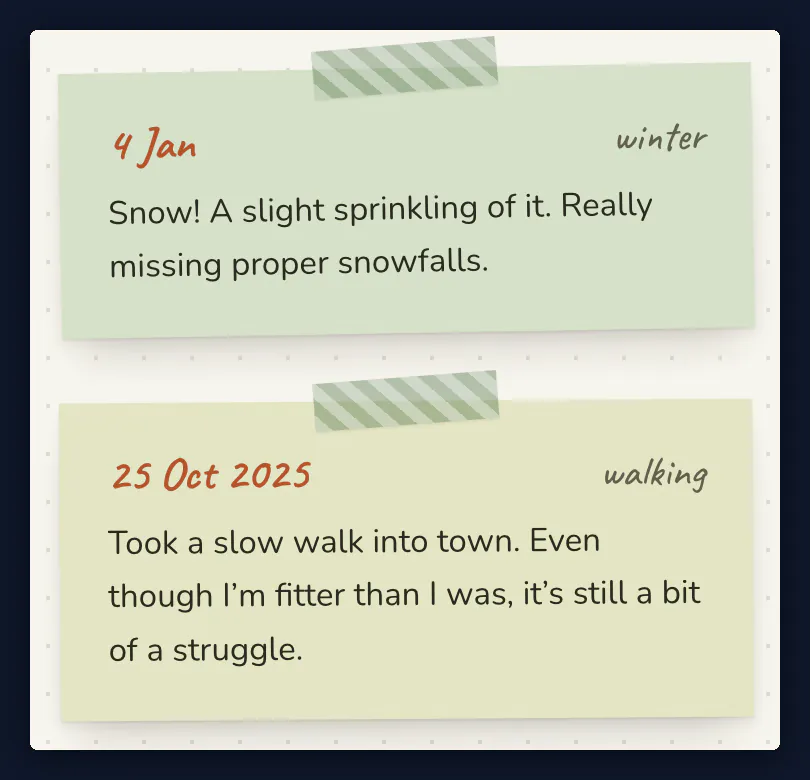
The next morning I filled the scrapbook. Backdating was my idea, so I wrote ten short notes, each dated to the day it actually happened, and WPVibe added them with those past dates. The ones from last year show their year, like 25 Oct 2025.
Then I went live. WPVibe parked the old layouts and published the new theme, and then I switched SeedProd’s Website Builder off myself. It had been running my whole live site, so that switch was the launch, and visitors had the new site a minute later.
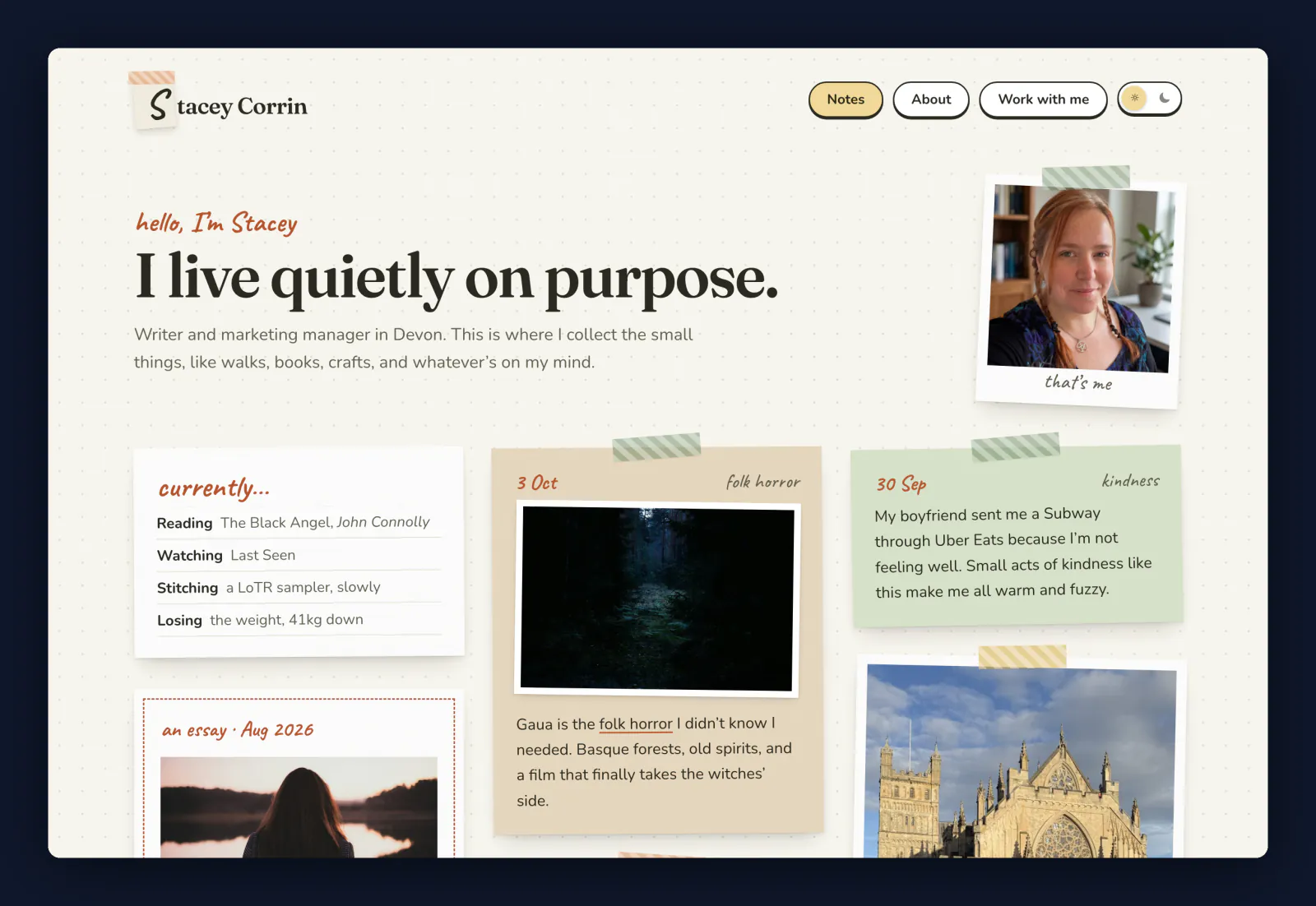
After that, the AI worked out redirects for my old Work and Blog pages, which don’t exist in the new design. WPVibe set them up through the redirect feature in AIOSEO, the SEO plugin on my site, so old links still land somewhere useful.
Claude then checked every page type as a visitor would see it, in day and night mode, on phone and desktop: “Nothing scrolls sideways, no pictures are broken, and all 45 links work.”
Both sessions added up to 2 hours 47 minutes for the build and launch. That’s clock time rather than hands-on time, so it includes the stretches where I’d wandered off.
Who Did What: Me, Claude and WPVibe
Looking back over both build chats, the work split three ways. Claude did the thinking and wrote the code, WPVibe did everything that touched my actual site, and I did the deciding.
Laid out side by side, my column is the short one, but it’s mostly decisions, and the build couldn’t start until I’d made them. If you’re wondering what’s left for you to do when AI builds your theme, it’s that first column.
| Me | Claude | WPVibe |
|---|---|---|
| Said what felt wrong, twice | Designed every option in chat | Connected Claude to my real WordPress site |
| Threw away the finished grid design | Wrote the 17 theme files | Kept the new theme as a draft, so the live site was never touched |
| Asked for notes instead of long posts | Found the old layouts that would have broken launch | Gave me a private preview of the draft on my own site |
| Had the backdating idea, and wrote ten notes | Cleaned up the photos | Checked each code file as it was uploaded |
| Spotted the yellow-note bug | Fixed the bug in under a minute | Got my photos into the media library |
| Decided older notes show their year | Checked 162 measurements and 45 links | Saved a backup of the old theme on every publish |
| Switched SeedProd’s Website Builder off to go live | Published the new theme, and set up the redirects through AIOSEO |
Frequently Asked Questions
How long does a website redesign take?
How long a website redesign takes depends mostly on how long you take to decide. Mine took nearly three weeks of spare time to work out what I wanted, then 2 hours 47 minutes for Claude and WPVibe to build and launch it.
Can AI redesign my website?
AI can redesign your website, in the sense that Claude designed every option and built the theme, and WPVibe did the work on the site as a draft. What it can’t do is tell you which design feels like you, and that part was still mine.
Can I go back to my old design?
Going back to my old design is still possible, because SeedProd’s Website Builder is switched off rather than deleted, so the old design is all still there. WPVibe also saved a backup of the previous theme every time it published, three times on launch day alone.
Would I Let AI Redesign My Site Again
Yes, I’d let AI redesign my site again, and next time I’d go in knowing where the time goes. AI wrote a theme I couldn’t have written, and WPVibe kept it away from my live site until I flicked the switch myself.
No amount of building tells you what you want. Not knowing how to build it turned out to be the easier problem.
If you’ve been putting off your own redesign for the same two reasons, I’d start by asking for options and noticing which ones feel wrong. That’s how I found mine.
WPVibe is free to start, and the Build a Custom WordPress Theme with AI recipe from the WPVibe cookbook, a library of ready-made prompts for WordPress jobs, has the prompts to try it on your own site. And if you’re feeling nosy, the scrapbook is live at staceycorrin.com.