“I Get a New Employee to Go Do Work… and I Just QA”
Keith Derington runs Skulls Tees & Clothing Company around a full-time job. Most of the work on its WordPress site used to be his to do by hand, one edit at a time.
Now he talks each change through with ChatGPT, WPVibe makes it in WordPress, and he checks the result. While the pages are being built, he’s free to email new leads.
About 2 days
Calendar time for the first Groups site, around a full-time job (Keith’s estimate)
$250 to $1,000
What he paid developers per site for his earlier websites
Meet Skulls Tees
Skulls Tees & Clothing Company is a small custom-apparel business in the Houston area. It makes decorated apparel for dive shops and resorts, businesses, sports teams, schools, churches and community groups.
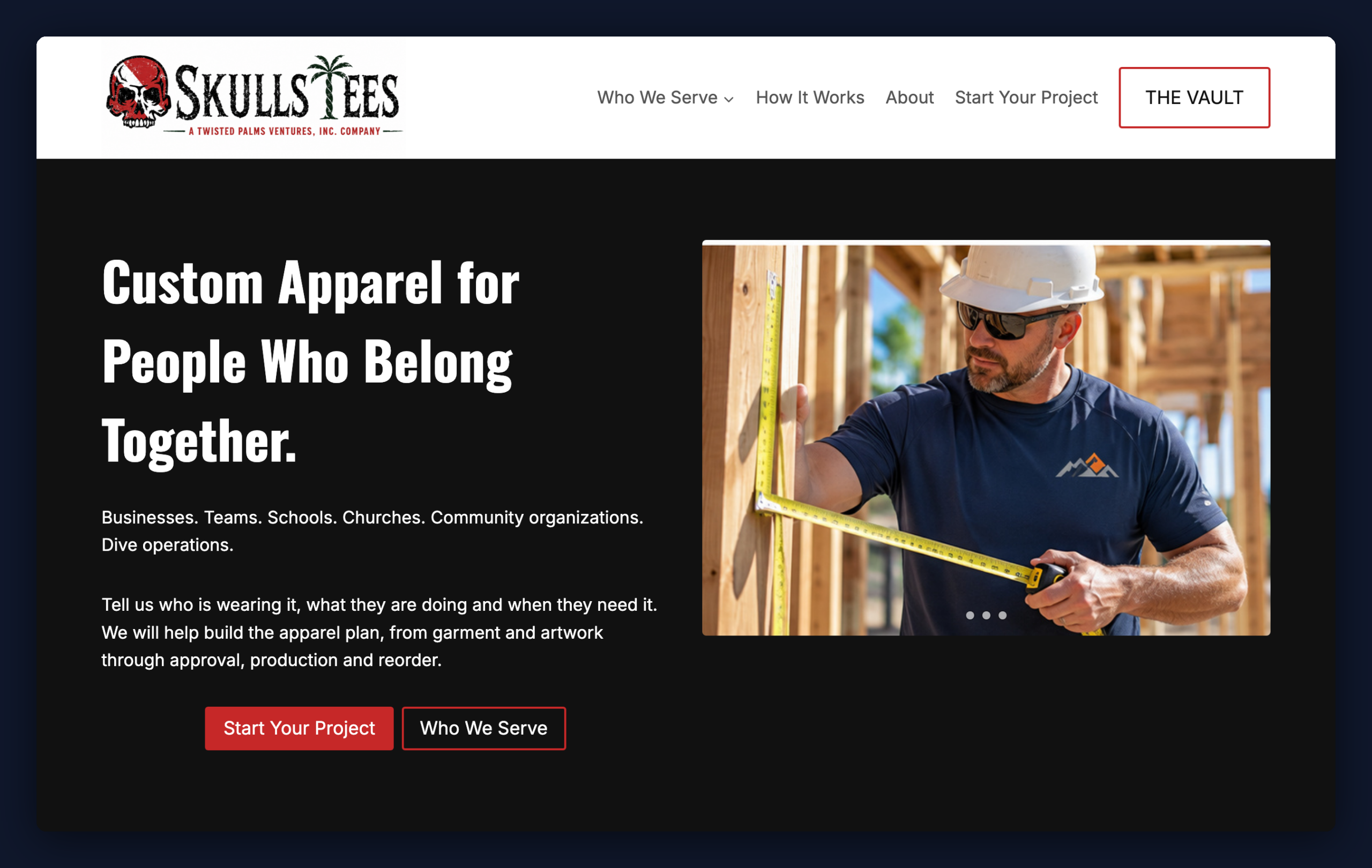
Keith is a PADI Open Water Scuba Instructor, which is why dive is the company’s specialty. The site runs on WordPress with Kadence.
A Bigger Audience Meant a Lot More Pages
Skulls Tees started with scuba. In late September 2026, Keith wanted the website to reach everyone else who orders group apparel.
That meant a whole set of new pages, each with its own audience, copy, cards and calls to action, and every one of those edits would have been his to make on top of his day job.
The other route he knew was paying someone. For earlier websites he’d hired developers, at between $250 and $1,000 a site.
ChatGPT Plans, WPVibe Builds, Keith Decides
ChatGPT is where Keith plans each page: who it’s for, how it’s laid out and what it says. WPVibe connects that chat to his WordPress site, so the changes they agree on get made there instead of handed to him as copy to paste.
His changes follow the same rhythm.
- He describes the result he wants. Usually that’s a page, a section or a fix, with a link to where it lives.
- They talk through the structure. ChatGPT sets out what it plans to change, and Keith adjusts it.
- Keith gives the go-ahead. In his chats, that’s often a one-word “/go”.
- WPVibe makes the change in WordPress. New pages go in as drafts.
- He checks the real page. If it isn’t right yet, they go round again.
Drafts first was Keith’s own instruction for the Groups build, and ChatGPT kept to it, so nothing new went live until he’d approved it.
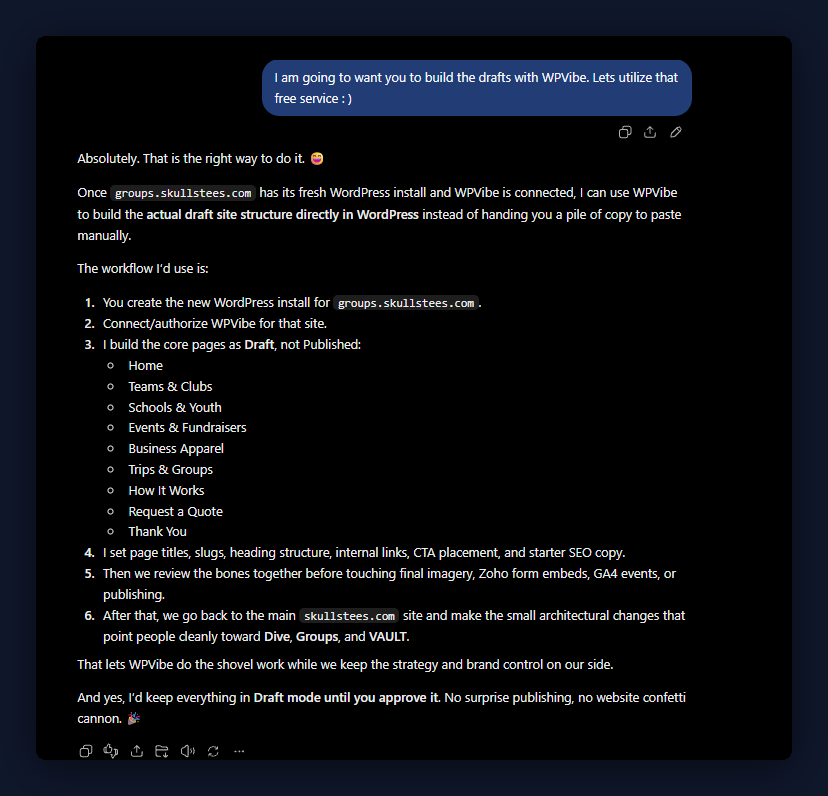
It also lets him step away. Two pages he asked for before leaving were waiting as drafts when he got back.
What Keith Checks Before Anything Goes Live
“I review the actual page, not just the AI’s description of what it did,” Keith says. His checks cover what a customer would notice first.
- Layout and spacing, and how the page looks on a phone
- Headings that are easy to read against their background
- Cards that match in size, with the right images in them
- Links, buttons and pop-up image viewers that work
- Copy that reads well, on a page that serves the people it’s for
WPVibe makes the change, and Keith decides when a page is ready to go live.
About Two Days for the First Groups Site
Keith built the first Groups site, at groups.skullstees.com, in late September and early October 2026. By his estimate it took roughly two days on the calendar, over many sittings around his full-time job, not hours of continuous work.
He later merged it into skullstees.com, where that work lives today, and kept building.
- Pages for each kind of customer. The Teams, Churches and Community pages got matching cards, clearer headings and better contrast.
- A rotating conservation spotlight. The Conservation page now features real ocean organizations in turn, starting with Reef Check.
- Artwork previews for customers. Keith has preview pages for individual customers, with design cards, garment mockups, a revisions section and full-size images that open on click.
WPVibe didn’t make the artwork. It built the pages that present it, which are real customer presentations, not just marketing pages.
Not Every Edit Landed the First Time
Keith is upfront that some first versions came out wrong: artwork previews far too big, cards in different sizes, spacing and colors off in places, and a carousel that needed redoing.
Each time, Keith looked at the real page, said exactly what was wrong, and had WPVibe change it again.
The carousel shows how precise that gets. The first version paired his photos into a collage, so Keith spelled out the six images he wanted in order, one full image per slide, and asked ChatGPT to confirm it understood. It repeated the sequence back, waited for his “/go”, and 17 seconds later the live page matched.
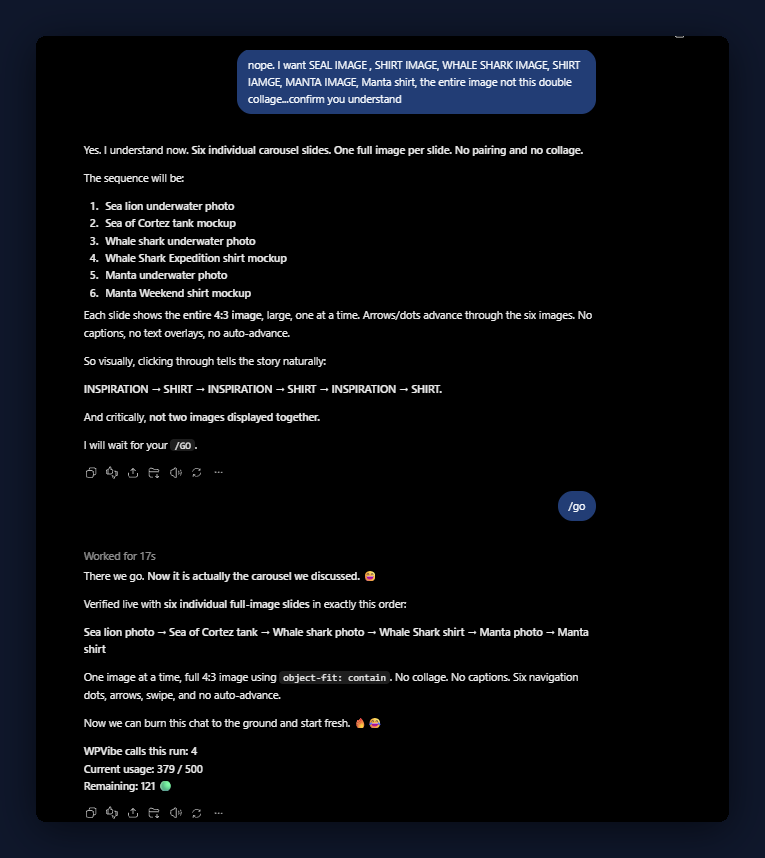
“Clear instructions, visual inspection, and iterative QA remain essential,” Keith says.
Time Back for the Rest of the Business
“I was able to send emails to new leads and follow up on opportunities in my pipeline while WPVibe and ChatGPT were making changes for me,” Keith says. For a business run around a day job, that’s the result that counts.
In Keith’s Words
I get a new employee to go do work while I do other more important things and I just QA! My role is still creative director and final QA.
Keith Derington, Founder, Skulls Tees & Clothing Company
Got more plans for your WordPress site than hours to build them? Borrow Keith’s routine. Talk the change through in your AI chat, let WPVibe make it, and check the real page before you call it done.
To set up the same routine on your own site, get started with WPVibe and connect your first site.