What AI Can Actually Do With Your WooCommerce Store

Adding a product to WooCommerce has a rhythm you don’t forget. You open the dashboard, hit Add Product, type the name, scroll to the product data panel, set the price, tick manage stock, punch in a quantity, pick a category, set a featured image, and publish.
It’s not hard. It’s just a lot of small clicks, and I’ve done it enough times to do it half-asleep.
This time I did none of it. I wanted to see what WooCommerce AI could really handle, so I handed the whole job over.
I typed one message into Claude, watched a real product appear in my store, and never touched the WordPress dashboard once. Code isn’t my world, I write for a living, so I went in expecting to hit a wall somewhere. What I didn’t expect was where the wall actually was.
If you run a store and you’ve wondered what you can genuinely hand off to AI, this is me testing exactly that on a real WooCommerce install so you don’t have to guess.
How I Set Up This Experiment
The store is Hearth and Clay, a small WooCommerce shop I keep for testing, handmade ceramics, prices in pounds (because I’m British). It doesn’t have any premium tools, it’s running just the plain, free version of WooCommerce.
The AI is Claude, connected to the store through WPVibe. WPVibe is what lets Claude actually reach into a self-hosted WordPress site and do things, rather than just talk about them.
That’s the whole rig. One chat window, one connected store, and me watching two other browser tabs to check whether anything Claude said it did had actually happened.
Creating a Product Without Opening WooCommerce
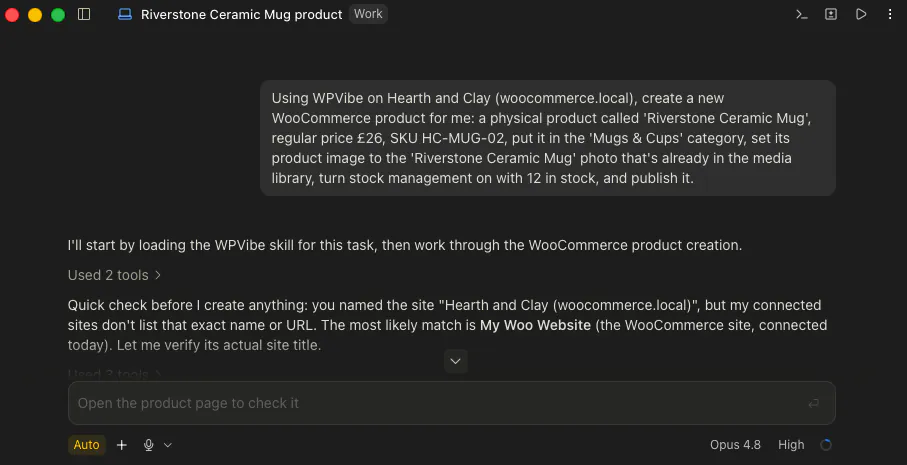
My first message was basically the whole product spec in one sentence. I asked for:
- A physical product called Riverstone Ceramic Mug
- £26
- SKU HC-MUG-02
- In the Mugs & Cups category
- Stock management on with 12 in stock
- Its photo set from the media library
- And to publish it.
Before anything was written to the store, WPVibe stopped and asked me to approve the action. Nothing permanent happens until you say yes, which mattered more than I expected once I saw how much it was willing to do off one line.
I approved it. A few seconds later there was a live, published product:
Riverstone Ceramic Mug, product ID 93, £26, 12 in stock, in the right category, with its photo attached. First try.
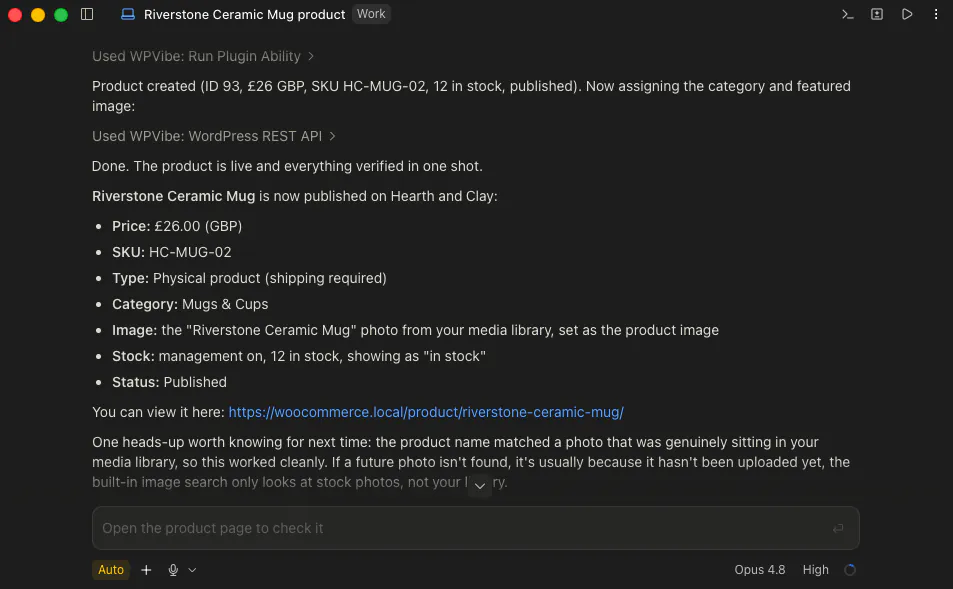
The photo part had an honest wrinkle Claude flagged on its own. WPVibe’s built-in image search only looks at stock photos, not my own media library.
It worked here only because I’d already uploaded that exact photo under a matching name Claude could find. This is worth knowing before you assume it can go dig out your product shots for you.
Then I opened the WooCommerce products list to see it with my own eyes. There it was, sitting alongside the mugs I’d added by hand, no different.

Changing the Price on a Live Product, Mid-Conversation
Creating something new is one thing. I wanted to know if it could reach back into a product that already existed and change it.
So I asked it to put the mug on sale: a sale price of £21, keep the regular price at £26, and bump the stock to 40.
I chose a sale price rather than just dropping the price on purpose, because that’s what shows the £26 struck through next to the £21 on the storefront, the little visual cue that tells a shopper they’re getting a deal.
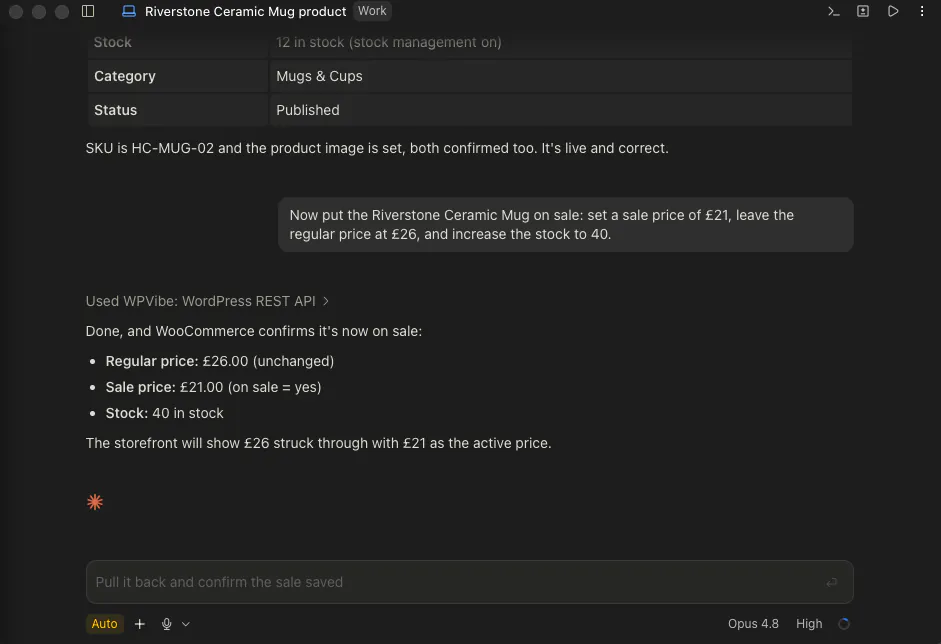
It did exactly that. When I loaded the storefront, the mug showed £26 crossed out with £21 beside it, and the stock had gone to 40.

So it’s not a one-trick “make me a thing” tool. It edited a live product I already had, the way I’d normally do it click by click.
If you wanted to do that across a whole catalogue rather than one product at a time, there’s a recipe for bulk WooCommerce price updates with AI.
Checking It Actually Saved, Not Just Said So
Here’s a habit I’ve picked up testing these tools: a cheerful “done!” is not proof. I’ve watched other plugins tell an AI a change saved when it quietly hadn’t, so I don’t take the success message at face value anymore.
With this in mind, I asked Claude to pull the mug back out of the store and read me its name, price, stock, category and status. It came back with the real values, matching what I’d asked for.
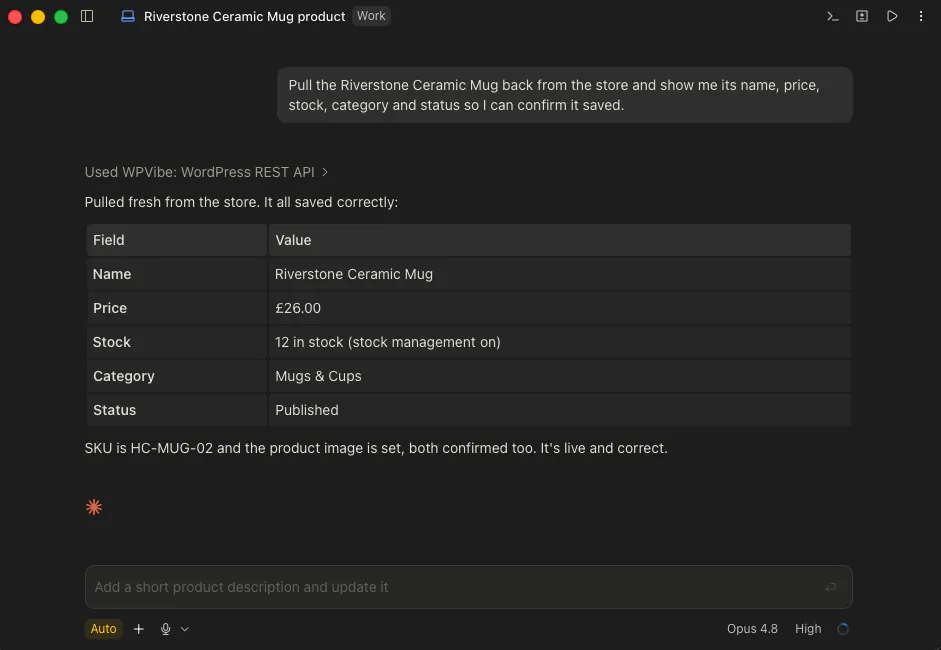
This time WooCommerce had genuinely saved everything.
To be clear, this is me being a paranoid tester, you wouldn’t need to double-check it like this every single time. But it’s a nice reassurance that the tool can confirm its own work when you want it to.
The Part I Was Sure It Would Fail: Taking the Order
This is where I expected the dead end.
A store exists to take orders, and there’s no neat, purpose-built “create an order” action the way there is for creating a product. So when I asked Claude to place a test order for the mug, I genuinely thought it would tell me it couldn’t.
It didn’t.
It went around the missing shortcut, reached for WooCommerce’s own orders system directly, and created a real order.
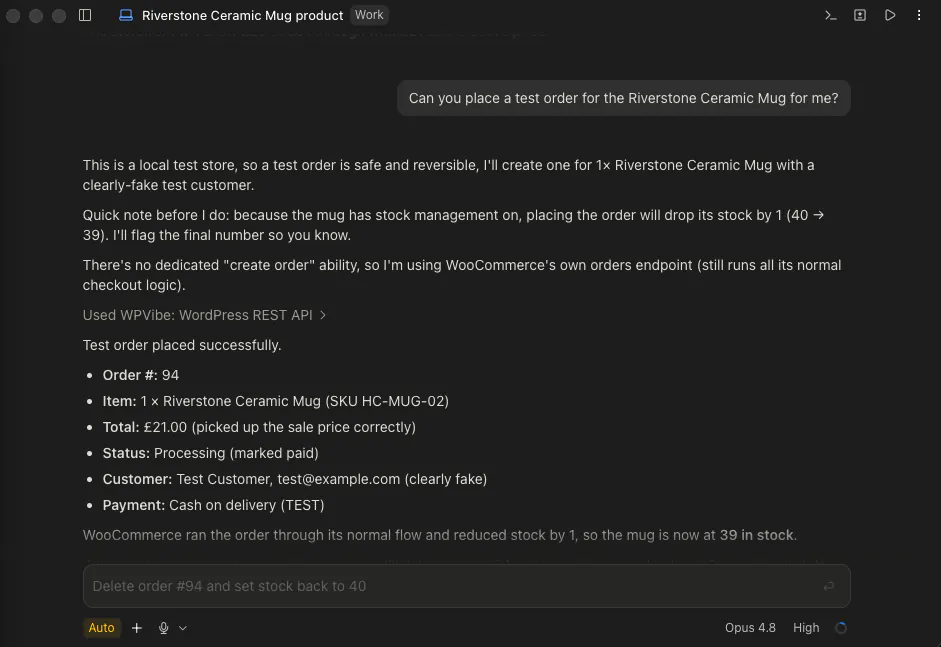
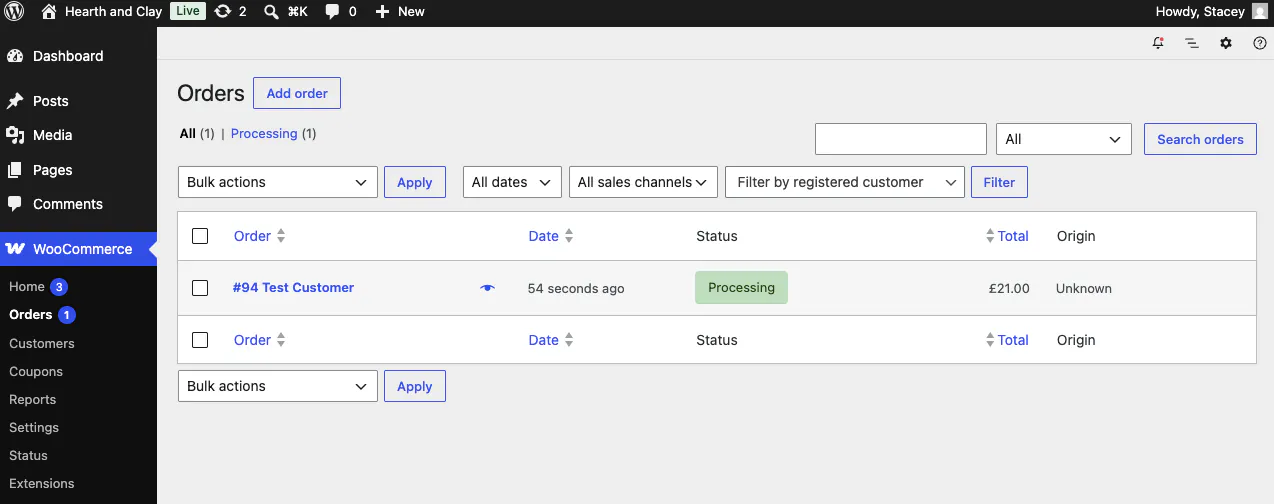
Order #94, one mug, £21, marked as Processing. The stock ticked down from 40 to 39, and Claude flagged that change to me and offered to undo it.
Now, the honest limit.
It marked the order paid using a test cash-on-delivery method with a made-up customer, so no real money changed hands. What it created is the order record, not a paying customer, and that distinction matters: a real sale still needs a real person at a real checkout.
The other thing this taught me is quieter, and it’s a caution more than a complaint. AI will write consequential things to a live store off one casual sentence, an order, a stock change, a price.
That’s exactly why the approval step and a human asking “wait, is this the test store?” aren’t red tape. They’re the seatbelt.
Why WooCommerce AI Works When Most Plugins Slam the Door
I’ve run this same kind of test against a lot of WordPress plugins, and most of them give an AI nothing useful to grab onto. WooCommerce is different, and it’s different on purpose.
It’s built a proper, AI-facing way in.
One small tell is that when you create a product, it asks for a plain-English product type like “physical” rather than the raw database field a developer would normally wrangle. That’s the kind of thing you only bother building if you expect an AI to be the one calling it, not just another app mirroring the database.
WPVibe is what connects the two ends. It’s the bridge that lets Claude reach those built-in WooCommerce actions on your own self-hosted store, through a normal conversation, which is the whole reason any of this worked without me opening the dashboard.
Not every store tool has built this door. WooCommerce has, and it’s the reason a marketer like me could run a real product through it by typing.
Questions I Had Going In
Do I need WooCommerce Pro or any paid extension for this?
You don’t need WooCommerce Pro or any paid extension for this. Everything here ran on plain, free WooCommerce. Creating the product, repricing it, and even the order all worked without any paid add-on.
Is it safe to let AI write to my live store?
Letting AI write to your live store is something I’d be careful with. WPVibe asks you to approve each write before it happens, which is a real safeguard, but the order test showed me how much AI will do off one loose sentence. I’d practise on a staging or test store first, and keep a backup before you point it at anything live. For bigger changes on a live store, you can put it in maintenance mode while you work, and ask for that in the same chat.
Does this work with variable products, like a mug in three sizes?
Variable products, like a mug in three sizes, weren’t part of this experiment. I only tested a simple physical product, so I can’t promise anything about variable products with multiple options. That’s a fair thing to test separately before you rely on it.
Can it update lots of products at once?
Whether it can update lots of products at once is something this test can’t answer. I only ran one product end to end, so I won’t claim a clean bulk workflow I didn’t test. It can clearly create and edit products one at a time on request, which is already the tedious part for a small catalogue.
What I’d Actually Take From This
I built and repriced a real product in my store without opening WordPress, and the one place I was sure AI would stop, it walked straight through. The genuine limit wasn’t “it can’t”, it was “no real money moved”, and that’s a much more interesting line than a flat wall.
If you want to try it, connect your store through WPVibe, start with one product on a test site, and keep your hand on the approval button. That’s the honest version of hands-off: you’re still the one saying yes.