I Asked AI to Check My WordPress Backups. It Couldn’t See the Problem.
Checking your backups is one of those WordPress jobs that’s easy to agree with and easy to never do. You set a schedule, it says it’s running, and the first time you really look is often the day something breaks.
So I handed the looking to AI. I asked Claude to check my scheduled backup, and it told me the backup was complete and full, which it was.
What it couldn’t see was that the backup had started 12 minutes late, because it was waiting for someone to visit the site. It also told me to move the backup off a server the backup had never been on. Here’s how I found both, and what I ask Claude now instead.
I Scheduled a WordPress Backup, Then Had Claude Watch It
My backups run through Duplicator Pro, a WordPress backup plugin, and I set up a weekly schedule on my test site, Birch and Bloom, for Fridays at 10:00. Each backup goes to Google Drive only, with no copy left on the server. It had to be Pro, because the free version of Duplicator doesn’t schedule backups.
Birch and Bloom is a pretend plant shop that gets almost no visitors, a lot like a small business site overnight. This turned out to matter more than anything else about it.
Claude reaches my site through WPVibe, which connects AI assistants to WordPress. Duplicator’s AI commands, the actions it lets an assistant run such as starting a backup, show up as soon as the plugin is switched on. Our post Your AI Just Learned Duplicator covers everything those commands can do.
I wanted to know whether the 10:00 backup really ran at 10:00, so on the first Friday it was due, I had Claude keep an eye on Duplicator’s backup records. It read them straight from the database rather than loading the site.
The 10:00 Backup Started at 10:12
At 10:00, nothing happened. By 10:12 there was still no sign of a backup, so Claude loaded the homepage once, to see whether a single visit was what it was waiting for.
The backup started that same second, and two minutes later it was sitting in my Google Drive, complete and exactly where it should be.
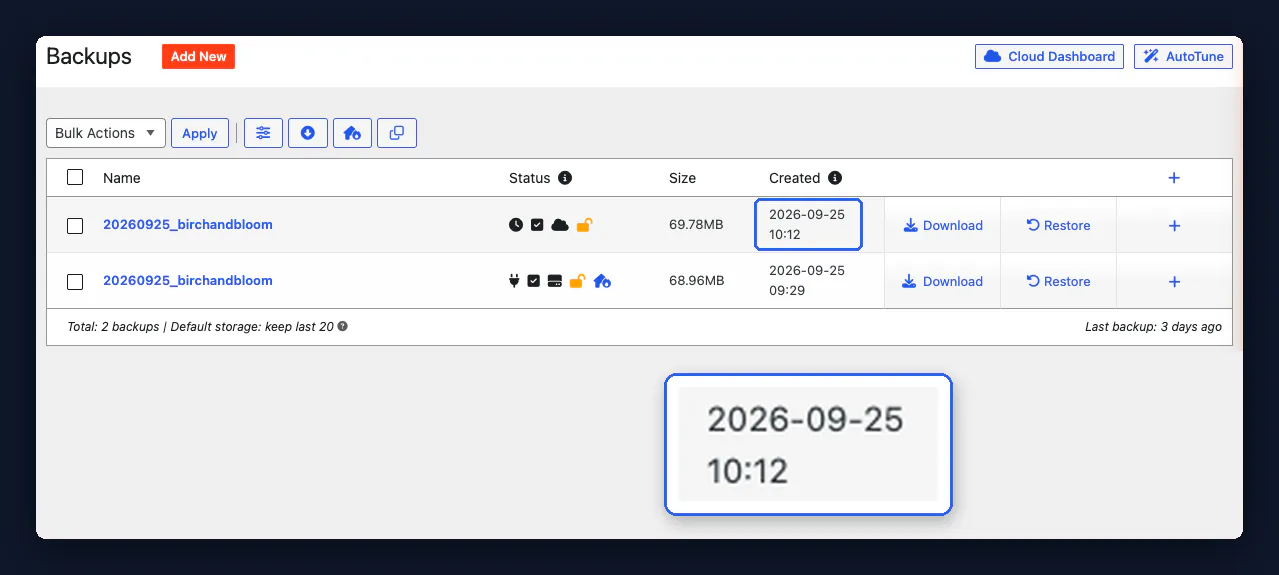
So the backup hadn’t failed. It had just been waiting, which is an odd thing to learn about a job whose whole point is that nobody has to be there.
Why WordPress Backups Wait for a Visitor
WordPress backups wait for a visitor because of WP-Cron, the scheduler built into WordPress, which only checks for jobs that are due when someone loads a page. The WordPress Plugin Handbook gives the example of a task set for 2:00PM that doesn’t run until 5:00PM, because nobody visited in between.
That goes for every scheduled job on the site, scheduled posts included. So a backup schedule doesn’t really mean 10:00. It means the first visitor after 10:00.
Duplicator warns about this right under the start time, to its credit. Its note says schedules “require web site traffic in order to start a build,” and suggests a cron job that visits the site on a timer if your traffic is low.
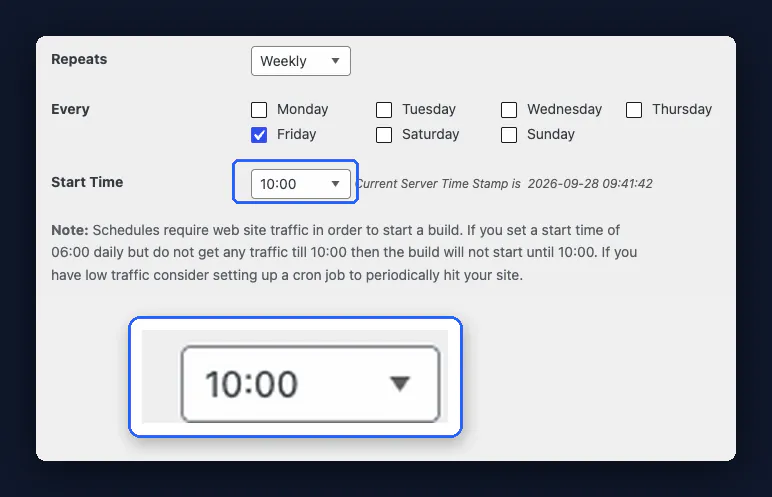
Twelve minutes didn’t cost me anything. On a quiet site or an overnight schedule, though, the wait can run to hours, and anything that goes wrong in that gap is only covered by the previous backup.
The part that bothered me most came afterward. Claude ran WordPress’s own scheduler test through WPVibe, and it came back with “WP-Cron spawning is working as expected.” It was right, too, because the scheduler works. It just doesn’t work on time without a visitor, and a passing test won’t tell you that.
Then I Asked a Fresh Claude to Check the Backup
The Claude session that had been watching knew all of this. Someone checking their own backups wouldn’t have been watching, so I opened a fresh Claude chat that knew nothing and pasted in the Check your Duplicator backups with AI recipe from the WPVibe cookbook, a library of ready-made prompts for WordPress jobs, unchanged.
WPVibe ran Duplicator’s read-only status checks, and Claude got the main thing right. My newest backup was complete and full, with nothing excluded, and nothing had failed or was still running.
It also stepped around a trap. Duplicator labels a scheduled backup as not “usable,” because that label is only meant for backups the AI started itself. Claude ignored the label and went by the backup’s status and Duplicator’s own “ready for use” message instead, which was the right call.
Then it got two things wrong. Its advice was to “download a copy and keep it off the site, because a backup stored only on the same server won’t help if that server fails.” That backup had only ever been in Google Drive.
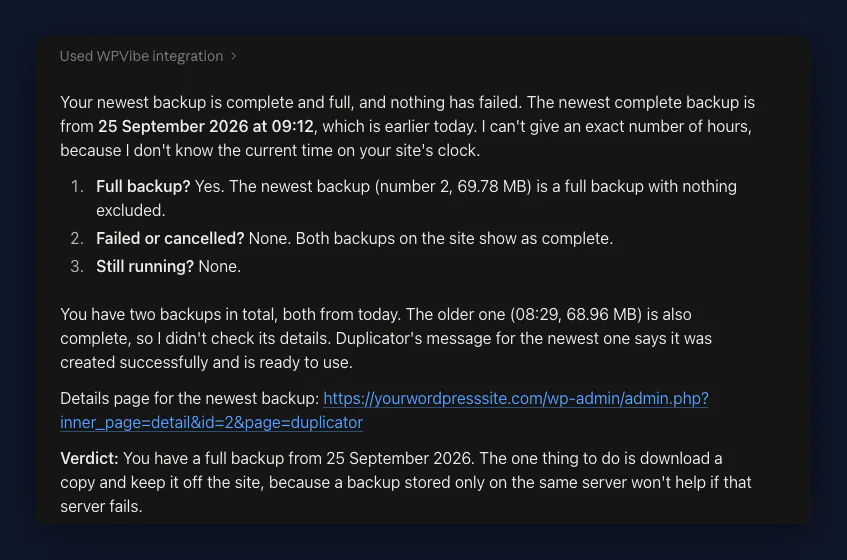
It also gave the start time as 09:12, an hour early, because Duplicator hands the AI its times in UTC without saying so, and my site runs on UK time. Duplicator’s own Backups screen shows the same backup at 10:12.
And nothing it could see showed the 12-minute wait.
Duplicator doesn’t tell the AI three things:
- where a backup is stored
- which timezone its times are in
- when a schedule was meant to start
So Claude answered the question it could see.
If I hadn’t set that schedule up myself, I’d probably have gone off and downloaded a copy I didn’t need.
What I Ask Claude Now When It Checks My Backups
The fix is to hand Claude the facts it can’t find on its own. I still use the same recipe, and now I add three lines to the end of it:
My scheduled backups go to Google Drive only, with no copy on the server. My site runs on UK time. Also read my Duplicator schedule’s last run time and tell me how it compares with the scheduled start.
That last line is the one I like, because Duplicator has no AI command for schedules at all. WPVibe reads the schedule from Duplicator’s settings anyway, without changing anything. On my site it showed the last run at 10:14, which is the finish time, and for a backup that takes two minutes that only adds up if it started late.
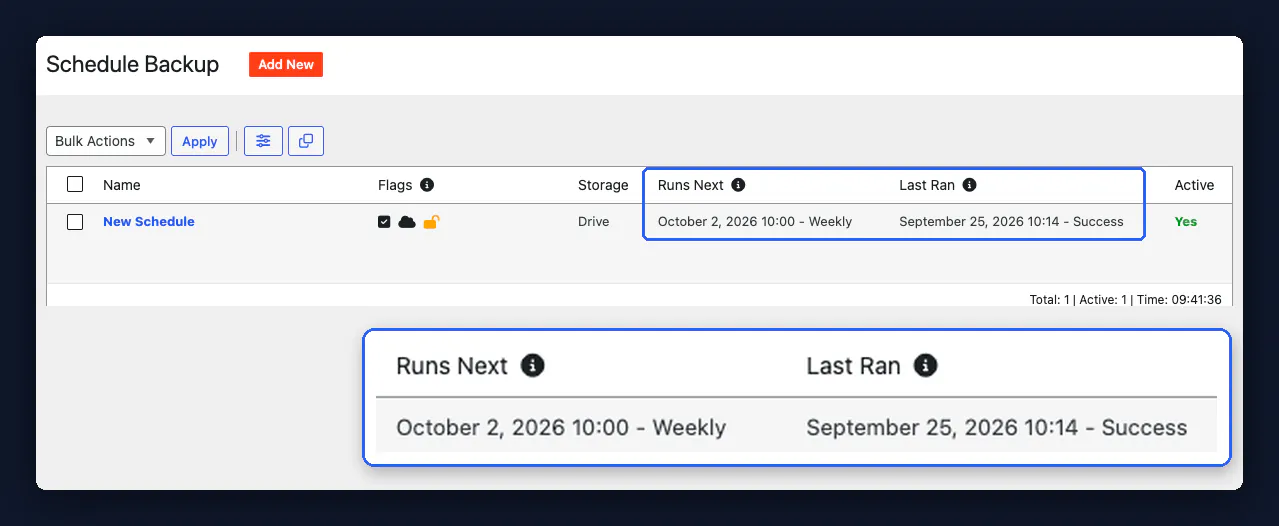
The rest of my routine is short:
- I look in Google Drive myself. Nothing in the backup check shows Claude the file. I tried Claude’s Google Drive connector too, and it came up empty, because it only sees the Google account it’s linked to and my backups go to a different one. So confirming the file landed is still my job.
- I don’t trust the schedule on a quiet site. Duplicator’s cron job suggestion is the fix, and the WordPress Plugin Handbook explains how to hook WP-Cron into your server’s scheduler.
- I take a fresh backup before a WordPress plugin update. The Back up your site before a plugin update with AI recipe has Claude start a full backup and only update the plugin once Duplicator says it’s complete. Free Duplicator doesn’t schedule backups, so on the free version, backups like this one are the ones you’ll have.
What AI Still Can’t Do With Your Backups
As of September 2026, AI can’t do these things with your Duplicator backups:
- Create or change a schedule. Duplicator’s three AI commands list backups, start one and check on it, so the schedule is still a dashboard job.
- Restore a backup. Restoring stays in the Duplicator dashboard, and honestly, that’s where I’d want it.
- Spot files a backup quietly missed. Duplicator’s list of exclusions only shows what someone chose to skip.
Frequently Asked Questions
Does WordPress back up automatically?
WordPress doesn’t back up your site automatically. Its own backup handbook points you to your host’s backup tools or a backup plugin, and the plugin is what handles the schedule.
Where should I store WordPress backups?
WordPress backups are safest stored in more than one place. The WordPress backup handbook suggests keeping three to five recent backups, spread across your hosting server, cloud storage such as Google Drive, and your own computer.
Can I back up just the WordPress database?
You can back up just the WordPress database with Duplicator. When your AI starts a backup, it gets two options, the whole site or the database only.
Would I Trust AI to Check My Backups Again?
Yes, I’d trust AI to check my backups again, as long as I tell it where my backups go and what timezone my site uses, because the status it gave me was right.
What I won’t trust again is the time on a schedule. On a quiet site, 10:00 means the first visitor after 10:00, and no “complete” status tells you when a backup started, so now I ask for that too.
If you want to run the same check on your own site, you can connect Claude to WordPress for free.