11 WordPress Maintenance Tasks Worth Handing to AI
Every WordPress site maintenance checklist hands you the same thing. A numbered list of jobs, all weighted the same, with nothing on it to tell you which ones are still your problem.
I counted 21 separate WordPress maintenance tasks across the three checklists ranking highest in Google right now. Eleven of them can be handed to AI completely, six it starts and you finish, and four should stay with you.
The checklists aren’t wrong about the work. They’re just older than the question, because they were written when every one of those jobs was yours, so none of them grades anything.
I graded the whole list on a live test site, which is the tedious half of this and the reason you don’t have to repeat it.
Jump to a section:
- What Handing Over a WordPress Maintenance Task Means
- 11 WordPress Maintenance Tasks AI Can Handle Today
- 6 Maintenance Tasks AI Starts and You Finish
- 4 Maintenance Tasks That Should Stay Yours
- Your Firewall Can Lock AI Out Completely
- How I’d Run This WordPress Maintenance Checklist Each Month
- Frequently Asked Questions
- Would I Hand Over the Whole List
What Handing Over a WordPress Maintenance Task Means
Handing over a WordPress maintenance task means you ask for it in a sentence and it’s done, with an approval step in front of anything you can’t undo.
A WordPress plugin advertising AI support doesn’t clear that bar, which is worth knowing before you go looking.
What decides it is whether your plugin can be driven at all. Some plugins publish a list of commands AI is allowed to run, which WordPress calls abilities, and most publish none at all. When I tested 25 WordPress plugins in July, I read that as a wall.
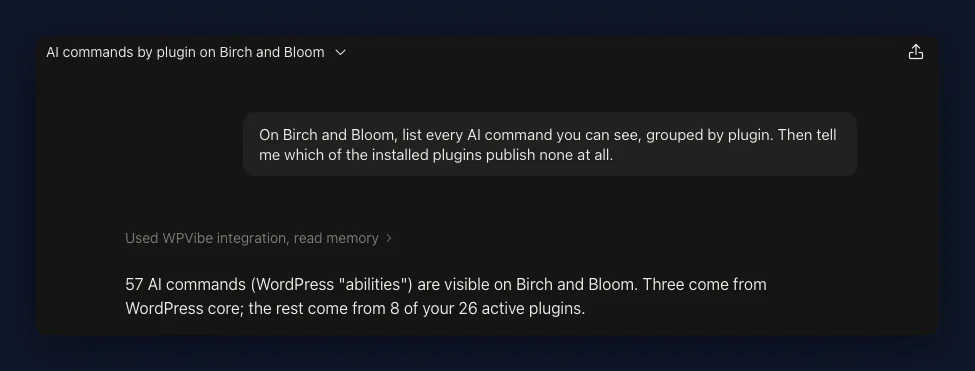
Zero abilities in a plugin doesn’t mean AI can’t drive it. The way in is your site’s own REST API rather than anything the plugin publishes, and every plugin plugs into that whether its team has thought about AI or not.
Why some plugins answer and others don’t turned out to need a post of its own.
Take Redirection, which publishes no AI commands whatsoever. Claude still installed it, set up its groups and built my redirects straight off the 404 log, which I wrote up in how to set up a 301 redirect in WordPress.
11 WordPress Maintenance Tasks AI Can Handle Today
Eleven of the 21 maintenance tasks I reviewed need nothing from you once you’ve asked your AI assistant for them. I ran all of it with Claude, the AI assistant I use, connected to the site through WPVibe.
WPVibe is a remote server that gives your assistant real access to your WordPress site, so it can read and change real things rather than tell you where to click.
| Task | What your AI assistant does |
|---|---|
| Back up the site | Starts a backup, tells you when it has finished, and lists the ones you already have |
| Update core, plugins and themes | Lists what needs updating on every site you have connected, then updates them. WordPress core waits for your approval |
| Remove unused plugins and themes | Finds the ones you aren’t using. Removing them needs your approval first |
| Clean up the database | Clears out expired temporary data and leftover settings. Anything that changes the database waits for your approval |
| Test and improve performance | Runs a Google Lighthouse speed test, then fixes what the test flagged |
| Clear the cache | Works out which caching plugin you run and clears it, either the whole site or a single page |
| Find 404s and set redirects | Reads your log of broken incoming links and builds the redirects to fix them |
| Moderate comments and clear spam | Approves, unapproves, trashes and deletes comments, and clears the spam queue in bulk |
| Manage users | Adds and removes users and changes their roles. It can’t delete your last administrator |
| Run an SEO audit | Scores your site, lists the posts missing an SEO title or description, and shows you the worst performers |
| Put the site in maintenance mode | Switches maintenance mode on and off, and tells search engines the site is temporarily down |
A few of these lean on a specific plugin being installed, so Duplicator handles the backups, AIOSEO the SEO audit, and SeedProd the maintenance mode.
Backups, Including Whether They Finished
Most people I talk to assume backups can’t be on that list, so start there.
Duplicator, for example, a popular WordPress backup plugin, publishes three backup commands from the moment you activate it:
- Start a backup
- Check whether it finished
- List the ones you already have
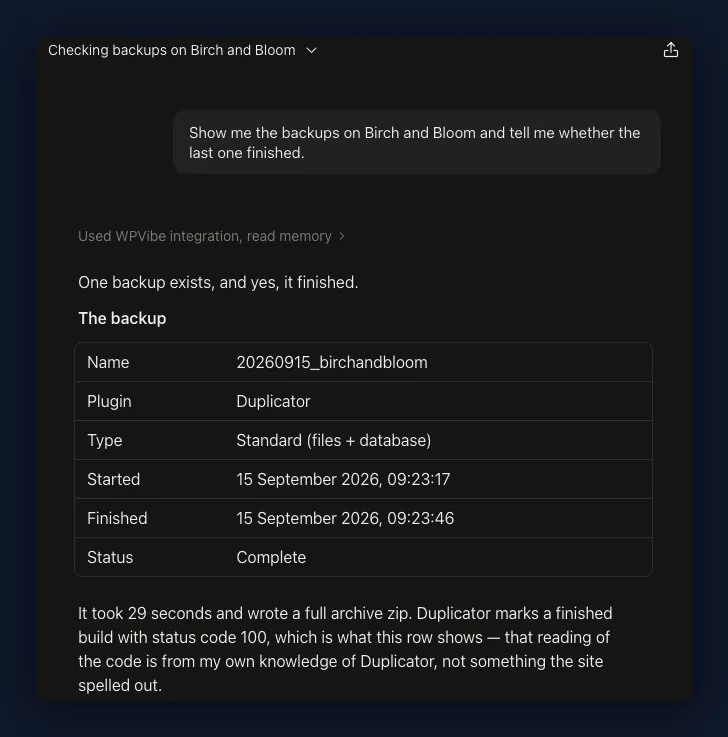
I nearly walked straight past the middle one. Starting a backup is the easy thing to claim, and knowing whether it finished is the part that actually protects you.
There’s no connect step to find first either, and no AI tab buried in the plugin’s settings. It answers from the moment you activate it.
Updates on Every Site You Have Connected
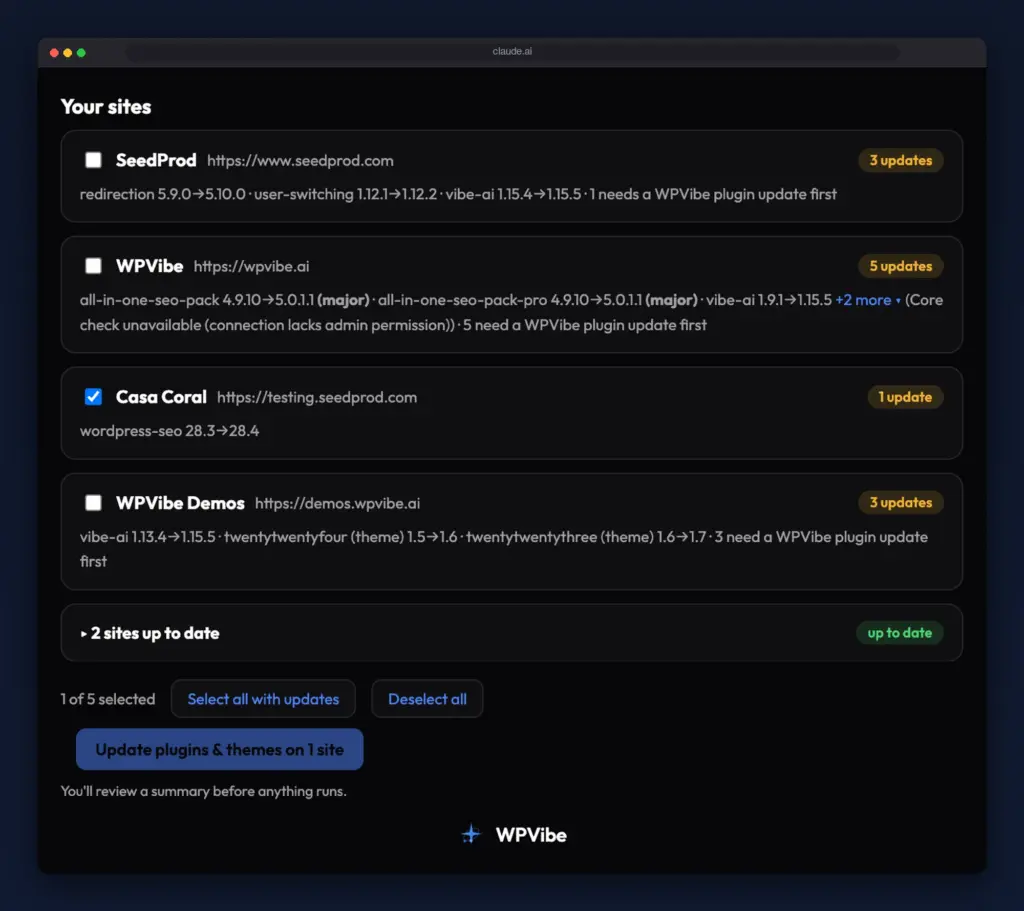
Updates are what people actually open a site manager for, and that’s now a message instead. Claude reads the pending plugin, theme and core versions for every site I’ve got connected, puts them in one roster, and runs the lot.
Core WordPress gets held back, and I’d rather it was. You have to opt in, and then it stops for a separate approval in the browser, because core is the one update WPVibe can’t roll back for you afterward.
I wrote the whole thing up when fleet updates shipped in 1.16. They’re free on every plan.
Comment Spam and Database Junk
Nothing I handed over to my AI assistant felt better than spam and database junk, because that work was never interesting, it was just there.
Eight comment commands cover it:
- Approve a comment
- Unapprove one
- Mark it as spam
- Mark it as not spam
- Move it to trash
- Restore it from trash
- Delete it
- Reply to it
The thing I expected to break was volume, and it didn’t. Past roughly 25 comments, or when you just say clear all the spam, it runs in the background instead of one request that times out halfway through.
Cache Clearing, and What Happens When It Fails
Cache clearing looks trivial until you count how many caches a WordPress site has. One command works out which caching plugin you’re running and can clear a single page instead of the whole site, and it knows WP Rocket, LiteSpeed and W3 Total Cache by name.
The Cloudflare plugin quietly ignores requests to clear the cache when its automatic cache management toggle is switched off. Nothing errors, and nothing tells you.
Except WPVibe does tell you, and points at the setting, rather than handing back a success it never got. That came out of asking my AI why my site was slow, and honestly it bought more trust from me than any feature list would have.
6 Maintenance Tasks AI Starts and You Finish
In five of these six, Claude finds the problem and then can’t finish the fix. That still saves me the hunting, which was always the slow part, but somebody has to do the last step and it’s you.
| Task | Where it stops |
|---|---|
| Optimize your images | Tells you which images are the wrong size. It can set up a converter for new uploads, and your existing library waits on you |
| Test your contact forms | Reads the form and its fields. Can’t send a test message through it |
| Fix broken outbound links | Catches broken links coming in. Going out, it reads your posts and checks them, then waits on you to approve each fix |
| Review and refresh old content | Can rewrite anything you point it at. Deciding what to cut stays yours |
| Monitor error logs | Reads code snippet errors and email errors. No general site activity log |
| Click through your pages | The accessibility test catches some of it. The rest is you looking at the screen |
Broken links sit in this group by a whisker. There’s a recipe that reads every post and checks every link it finds, and the repairs still come back to you one at a time to approve.
Images are the clearest one. There’s no compress, no resize and no regenerate anywhere in roughly 130 commands.
Meanwhile the page audit flags images served at the wrong size, so Claude tells me exactly which images on which pages are too big and then I go and shrink them myself. It can install a converter that handles new uploads for you, and your existing library still waits on you pressing the button.
Contact forms surprised me, because the useful answer isn’t the obvious one. WPForms publishes eight commands that read and build your forms, and not one of them submits a test entry.
So I check the mail log instead. Mail failure is the actual fault behind most “my contact form is broken” reports, and WP Mail SMTP keeps a log of email errors that Claude can read. I checked it on a clean site, so I’ve not watched it catch a real failure yet.
Content refresh is the one I’d resist handing over, even though Claude could mechanically do the whole job. On a content audit across a 490-post site, the number I actually cut was three.
4 Maintenance Tasks That Should Stay Yours
Security, passwords, analytics and hosting stay with you, and for two different reasons. Two are a gap in what AI can reach today, and two are a should not.
| Task | Why it stays with you |
|---|---|
| Run a security audit | It can check your files and your accounts. Judging what to harden is yours |
| Change passwords | Yours by design. No credentials are stored anywhere |
| Review analytics | Your analytics plugins stop at Google’s login. A gap, for now |
| Decide on hosting | Not a job to hand to a tool |
Passwords are the should not I’m happiest about. Even the user commands prefer sending somebody a set-password link over handling a raw password at all.
Security is the one I’d read carefully. Claude can compare your core and plugin files against WordPress’s official copies to spot anything tampered with, list your admin accounts and check whether XML-RPC is open, and no plugin I tested offers a malware scan of its own.
So you can get a real report. Deciding what to do about it is still a sit-down with the site rather than a message.
Analytics will annoy people more, I suspect. MonsterInsights and Site Kit both hand off to Google and then stop at Google’s own login, which an AI connection has no way to complete, and that was still true when I last checked in June.
GA4 and Search Console have their own APIs, so an AI absolutely can read your analytics, and I do exactly that most weeks. What it can’t do is reach your analytics through WordPress yet, so unlike every other job here, this is the one that means opening something that isn’t your site.
Your Firewall Can Lock AI Out Completely
Your firewall can take AI off your site completely, and mine did. That’s worth knowing before you harden anything, because security is the job every maintenance plan tells you to do first.
I turned on Wordfence, the most-recommended firewall there is. Claude lost access to the whole site, not just to Wordfence, while visitors carried on seeing every page as normal.
To get back in I had to log into the server itself and rename the plugin’s folder by hand, which isn’t something you can do from a chat window.
Why it happened is above my pay grade. What I can tell you is what I watched, in June, on the version current then. I haven’t re-run it since.
So you’re choosing between two things you genuinely want: a hardened site, or a site your assistant can still work on. I’m working on the version where you get both.
How I’d Run This WordPress Maintenance Checklist Each Month
Each month I ask for the eleven handable maintenance tasks in one message, read what comes back, and then do the handful of bits that still need me. Start to finish it runs to about half an hour.
What goes in that one message:
- Back the site up, and confirm the backup finished
- Run the plugin and theme updates, and hold core for me
- Clear the spam
- Clear out the expired temporary data
- Give me audit scores for the homepage and my three biggest pages
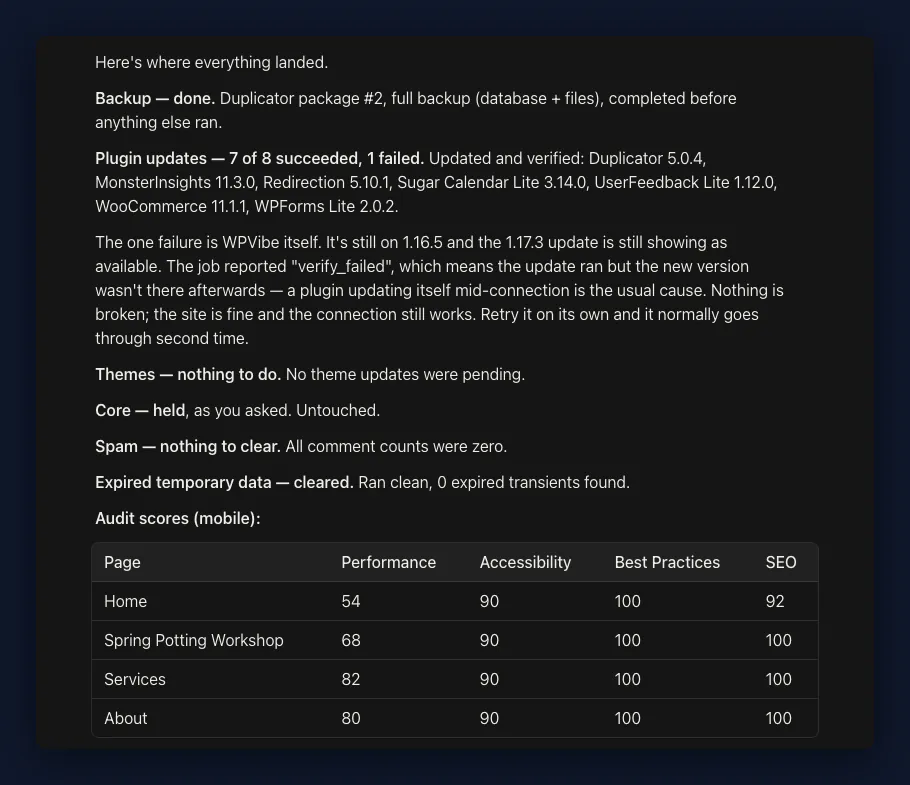
That last one needs the pages to be live and public, so a site behind a password or sitting on your laptop won’t return audit scores yet.
The audit is where the remaining work sits:
- The oversized images I need to go and fix
- The SEO fields left empty
- The accessibility flags worth a second look
There are two more I glance at rather than ask for. The 404 log, because a spike in it usually means I broke a URL, and the mail log, because a silent form is worse than an obviously broken one.
And two that I leave for a quarter. The content review, because that judgment doesn’t get easier by doing it monthly, and the security check, because it’s a sit-down with the site rather than a line in a chat.
Frequently Asked Questions
Why is WordPress maintenance important?
WordPress maintenance is important because an unmaintained site never announces itself. The plugin updates you skip become the holes people actually get hit through, the backups you never test are the ones that fail when you need them, and a database nobody clears quietly slows everything down. Maintenance is mostly insurance, which is exactly why it’s easy to postpone and expensive to have postponed.
How long does WordPress maintenance take?
Doing all 21 WordPress maintenance tasks by hand on one site, I’d budget two to three hours a month, most of it spent clicking through update screens and comment queues. Handing over the eleven takes mine down to roughly half an hour, and most of that half hour is reading what came back. The four you keep aren’t monthly jobs, so they don’t land in the number at all.
How much do WordPress maintenance plans cost, and do I still need one?
Prices vary enough that any figure I gave you would be wrong for somebody, and cost isn’t the deciding factor anyway. It comes down to who is responsible when something breaks at 2am. If you want that to be somebody else, keep the plan, because the eleven tasks above were never the expensive part of it.
Do all of these maintenance tasks need doing every month?
No, and treating them as one monthly block is part of why the list feels so heavy. Backups want to be automatic and constant, updates and spam suit monthly, and the audits and 404 log are fine quarterly unless something changed. The content review is a once or twice a year sit-down, and hosting you revisit when something annoys you enough.
Would I Hand Over the Whole List
I would, I already have, and it didn’t do what I expected. Handing over eleven jobs didn’t leave me holding a shorter checklist.
It left me holding a different one. What’s on it now is four decisions and six judgment calls, and none of those get faster with practice, because they were never the slow part.
The slow part was clearing spam. That’s gone, and I’d far rather spend a Friday deciding what to cut from 490 posts than deciding it after two hours of clicking Approve.
If you want to hand some of your own list over, there’s a cookbook of prompts for this sort of thing. Start with bulk clearing your spam comments, because it’s the job you’ll miss least.