WordPress MCP, Explained Without the Jargon
WordPress MCP is what lets an AI assistant like Claude or ChatGPT actually work on your WordPress site. You ask for something in a chat, and instead of getting a list of buttons to click, the change happens on the site itself.
I’ve been running my own WordPress jobs that way for months, from flipping a site into maintenance mode to adding a table of contents to a long post. Search for WordPress MCP, though, and you’d never guess it was that simple.
Page one is code repositories, developer documentation and a Reddit thread, all written for the people who build this stuff. They’re useful if you’re building it, and hard going if you’re trying to work out what it is and whether it’s worth trying when you don’t write code.
So here’s the plain version, from someone who uses it every week and has never written a line of it.
What WordPress MCP Actually Is
MCP stands for Model Context Protocol. The official MCP site calls it “an open-source standard for connecting AI applications to external systems,” and then gives the comparison that made it click for me: “Think of MCP like a USB-C port for AI applications.”
A WordPress MCP server is what plugs your site into that port. It hands your AI a set of WordPress tools, and the AI picks the ones it needs for whatever you asked.
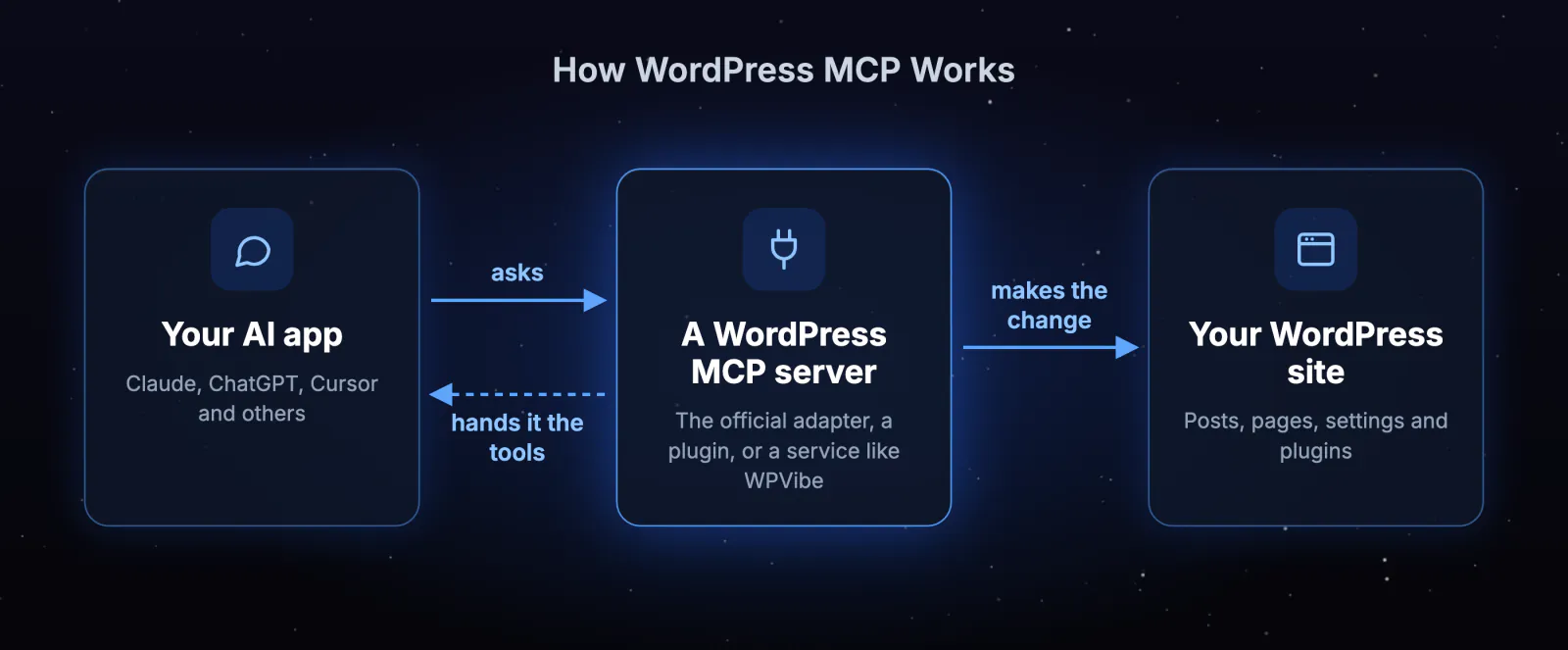
Without one, asking Claude to put your site in maintenance mode gets you a tidy list of steps to follow yourself. With one, Claude does the job and you check the result.
If you’re wondering whether this is just a Claude thing, it isn’t. Anthropic, the company behind Claude, launched MCP in November 2024. About a year later it handed MCP to the Agentic AI Foundation, “a directed fund under the Linux Foundation, co-founded by Anthropic, Block and OpenAI.”
So it isn’t tied to one app, either. The official site lists ChatGPT, Visual Studio Code and Cursor alongside Claude among the apps that support it.
What AI Does Once It Can Reach My Site
Most of what I hand over is small, everyday admin on Birch and Bloom, a fictional plant shop I keep for testing. I connect Claude to it through WPVibe, a service that runs the MCP server for you.
The first time I asked Claude to put the shop in maintenance mode, it found the site had no maintenance page at all. So once I said yes, WPVibe built one to match the shop and switched the mode on.
Another time I asked for a table of contents on a long test post with 16 headings. Claude pushed back that 16 links was too many for a table of contents, which was fair, so I picked the five that mattered and WPVibe added those.
And when an edit went wrong, I asked for the earlier revision back instead of digging through the revisions screen myself. In all three, Claude worked out what to do, and WPVibe made the change on the site.
Not every plugin can be driven this way, though, and the list of ones that can keeps changing. I wrote up which of 25 popular plugins AI could actually run, and the answer surprised me.
Does WordPress Have MCP Built In?
No, WordPress doesn’t have MCP built in, but it does have the piece the official MCP plugin is built on. WordPress 6.9 added something called the Abilities API, which I’ll explain in a second.
WordPress 7.0 then added an AI Client and a Settings > Connectors screen, with Anthropic, Google and OpenAI as the three default providers. The AI Client is easy to mix up with MCP, but it works the other way round.
According to the WordPress 7.0 Field Guide, it “lets plugins communicate with generative AI models,” which makes it WordPress calling out to an AI, not your AI app reaching in to work on WordPress.
WordPress’s official MCP support comes as a separate plugin, the MCP Adapter, made by the WordPress project. The WordPress AI team has said it expects the adapter to stay a separate plugin rather than become part of WordPress, so I wouldn’t wait for it to turn up in an update.
The WordPress Abilities API, in Plain Terms
Abilities are commands a plugin publishes for AI to use. WordPress defines one as “a self-contained unit of functionality with defined inputs, outputs, permissions, and execution logic,” which in plain words means each command says what it needs, what it gives back, and who’s allowed to use it.
They’re private by default, so nothing gets published unless the plugin chooses to. When I last had Claude check, most popular plugins hadn’t published a single one, and I go through which ones had in Why AI Can Run Some WordPress Plugins and Not Others.
4 Ways to Set Up WordPress MCP Today
“WordPress MCP” sounds like one thing you install. It’s actually a description, and at least four quite different setups fit it, from the official one the WordPress project makes to services that run the whole thing for you.
The differences that matter most are what you have to install, and whether it works with the Claude and ChatGPT apps most people already use in their browser.
| Setup | What you install | Works with Claude and ChatGPT in the browser? | What your AI can reach | Good fit for |
|---|---|---|---|---|
| The official MCP Adapter | A free plugin, plus a small helper app on your computer | Not yet | Only the commands WordPress and your plugins have published for AI | Developers who want the official, open-source route |
| A plugin that runs its own MCP server (AI Engine, Royal MCP) | One plugin on your site | Yes, through the plugin’s own sign-in | Depends on the plugin | People who want everything living on their own site |
| A service that runs the server for you (WPVibe is one) | A free plugin, and a connector you add in your AI app | Yes | Published commands, plus most of the rest of WordPress | People who want it working from the browser apps, with nothing to set up on a server |
| WordPress.com’s own MCP | Nothing on WordPress.com. On your own site, the Jetpack plugin, plus a paid Jetpack AI or Complete plan | Yes | WordPress.com’s tools, full access or read-only | Sites on WordPress.com, or already paying for Jetpack |
That middle column surprised me. The official MCP Adapter is a free plugin from the WordPress project, but Claude and ChatGPT in the browser can’t connect to it on their own yet, and its own setup guide says so.
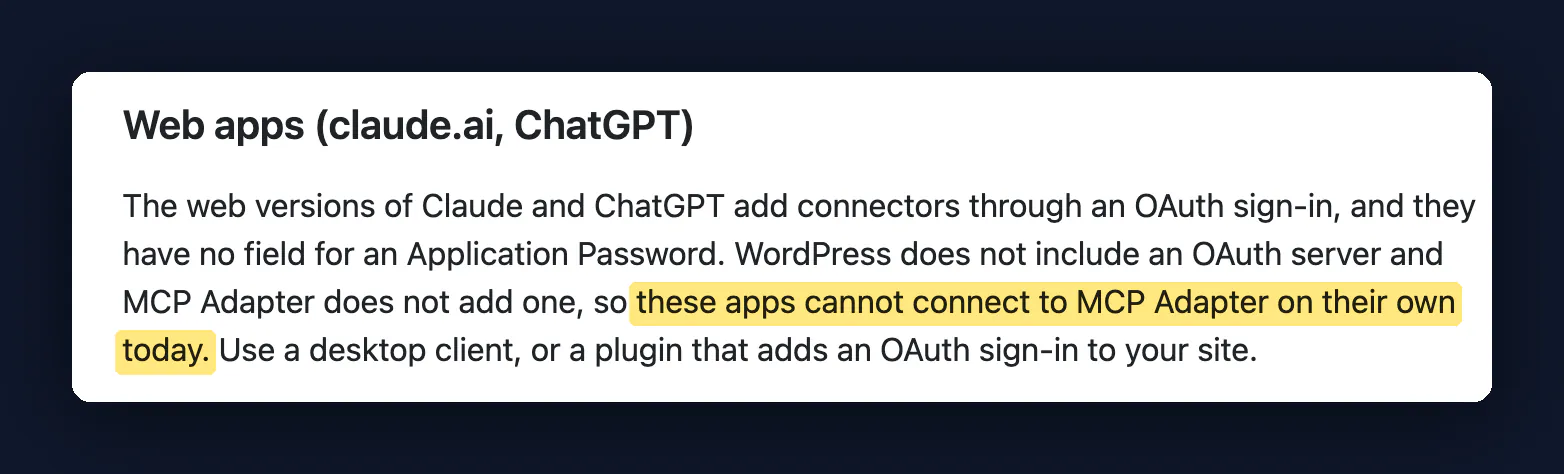
So the official route means you need
- A desktop AI app, because the browser versions sign you in through a web page, and the adapter has no way to handle that
- A special password WordPress creates for apps (an Application Password), pasted into a settings file along with your username
- A developer tool called Node.js on your computer, to run the small helper that passes messages between the app and your site
That’s fine if you’re a developer. It’s a lot if you just wanted AI to update a plugin.
It’s also worth knowing what the adapter hands your AI. It only passes on the commands WordPress and your plugins have published for AI. When I had Claude reinstall 25 popular plugins on a fresh test site in September, only WordPress itself and eight of those plugins had published any, 57 commands between them.
A plugin with no published commands isn’t off limits to AI, though. It can often still be reached through the standard route WordPress gives apps, which is how Claude set up my redirects in Redirection, a redirect plugin. It just needs a server that knows how to use it.
That’s where the four options really split.
- The official adapter, and plugins that run their own server, keep everything between your AI and your own site, which is a real plus.
- A service like WPVibe passes your AI’s requests through its own servers. In return it reaches past the published commands, and works from the browser apps with a sign-in in your browser.
The Setup I Use, and What the Adapter Does Better
My own setup is WPVibe, added as a connector in Claude. The free plugin goes on the site, and the WordPress MCP server itself runs on WPVibe’s side, so there’s nothing for me to set up or keep running on a server.
That’s what won me over, honestly. It works from Claude in the browser, which is where I already ask for everything else, and it stops to ask before anything risky like deleting a page.
It works with ChatGPT, Cursor and Claude Code too, and it’s in Claude’s Connectors Directory, so connecting is a case of clicking connect and signing in with your email. The WPVibe setup guides cover each app. If something on your site blocks the connection, the setup page in the WPVibe plugin spots it, and this post on the connection checks shows how.
The official adapter does some things better, though, and if any of them matter more to you than the browser apps, it’s the one to pick
- It’s official. The WordPress project makes and runs it.
- Free and open source. There’s no plan to outgrow, and anyone can read the code.
- Nothing in the middle. Requests go straight between your AI app and your site, with no extra service in between, while WPVibe passes them through its own service (it says it “only sees the tool calls the AI makes”).
- Built for developers. If the settings file and helper app above don’t put you off, it’s the right choice.
Frequently Asked Questions (FAQ)
Is WordPress MCP free?
WordPress MCP can be free, depending on the setup. The official MCP Adapter costs nothing, WPVibe has a free plan with unlimited sites and never charges for AI usage, and WordPress.com’s MCP needs a paid plan once a free site is past its first 30 days, or a paid Jetpack plan if your site is hosted elsewhere.
Do I need to know how to code to use WordPress MCP?
Whether you need to know how to code to use WordPress MCP depends on the setup you pick. A hosted service like WPVibe needs no code at all, while the official adapter needs some comfort editing a settings file and installing a developer tool on your computer.
Which AI apps support MCP?
The AI apps that support MCP include Claude, ChatGPT, Cursor and Visual Studio Code, among others. Each WordPress setup has its own list of apps it works with, though, so check the one you pick supports yours, especially in the browser.
Is MCP the same as the WordPress REST API?
MCP isn’t the same as the WordPress REST API, but the two work together. MCP is how your AI asks for something, and the REST API, the standard route WordPress gives apps, is one of the ways an MCP server can reach WordPress to get it done.
How do I stop AI accessing my WordPress site?
To stop AI accessing your WordPress site through WPVibe, revoke the Application Password it created, which you can do from your WordPress admin. Deactivating or even deleting the WPVibe plugin isn’t enough on its own, because the password stays behind. When Claude tested it for me, a tagline change still went through after the plugin was deleted, and when I revoked the password, that alone locked the AI out.
Would I Connect My Own Site Again
I already have, and it’s the site with my name on it. My personal site was redesigned and rebuilt through WPVibe. I said what I wanted, picked the design and launched it, while Claude designed the mockups and built the custom theme.
I wouldn’t point everyone the same way, though. If you’re a developer who wants it official and private, use the adapter, and if your site already lives on WordPress.com, theirs is the clean fit.
If you’d rather everything lived on your own site, a plugin that runs its own server does that. And if you just want to ask Claude or ChatGPT in the browser and have the job done, that’s the setup I use every week.
If you want to try the setup I use, you can start with WPVibe for free. The guided setup connects your site to Claude or ChatGPT, and from there I’d ask it for one small job you’d normally click through yourself.